Introduction
Your phone just died – and no matter what you try, it won’t charge. Before you panic and rush to a repair shop, read this.
If you are searching for “why is my phone not charging”, you are not alone. This is one of the most common smartphone problems faced by users in the UK and worldwide. A phone that refuses to charge can interrupt your work, communication, banking apps, navigation, and daily routine.
In many cases, users immediately assume the battery is dead or the phone is completely damaged. However, the reality is often much simpler. Charging issues can be caused by something as small as dust in the charging port, a faulty cable, or a minor software glitch.
The good news is that most charging problems can be diagnosed quickly and sometimes fixed at home without expensive repair costs. In this guide, we will break down every possible reason behind charging failure and explain when you should consider professional help.
How Phone Charging Actually Works
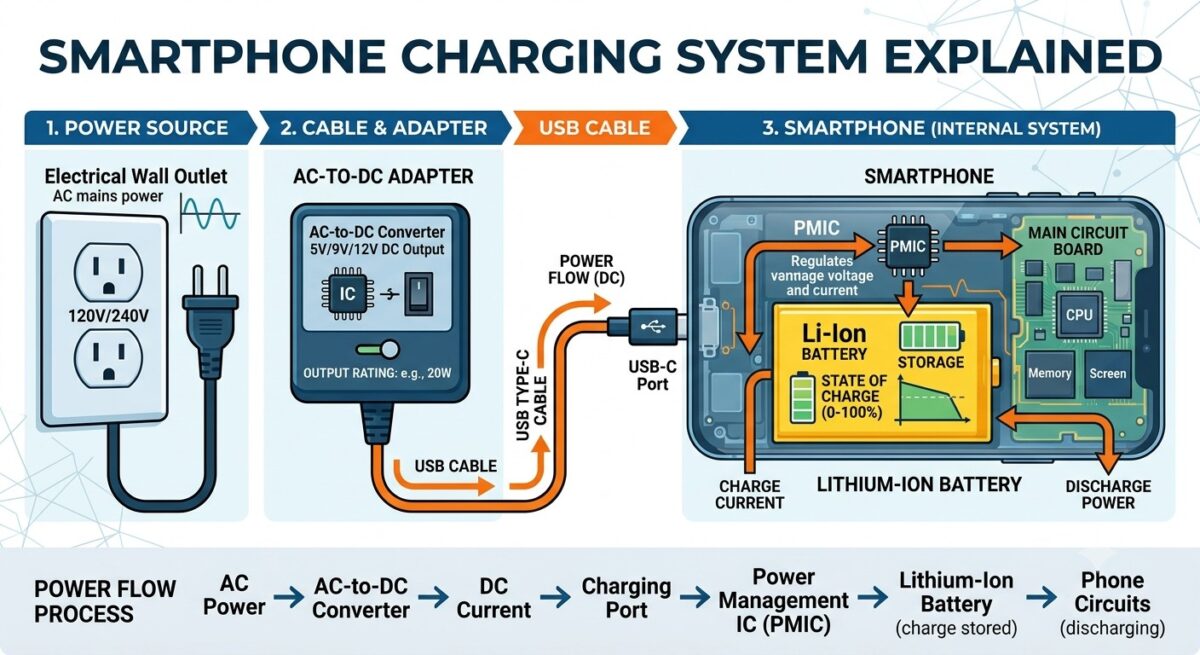
To understand why your phone is not charging, it is important to know how the charging system works. When you plug your phone into a charger, a full chain of components must work together:
- Power outlet supplies electricity
- Charging adapter converts power
- Charging cable transfers energy
- Charging port receives power
- Battery management system controls flow
- Battery stores energy
If even one part of this system fails, your phone will stop charging properly.
This is why charging problems are not always related to the battery itself. In fact, in many repair cases across iPhone Repair, Samsung Phone Repair, and Google Pixel Repair services, the issue is often found in the charging port or cable rather than the battery.
Common Reasons Why Your Phone Is Not Charging
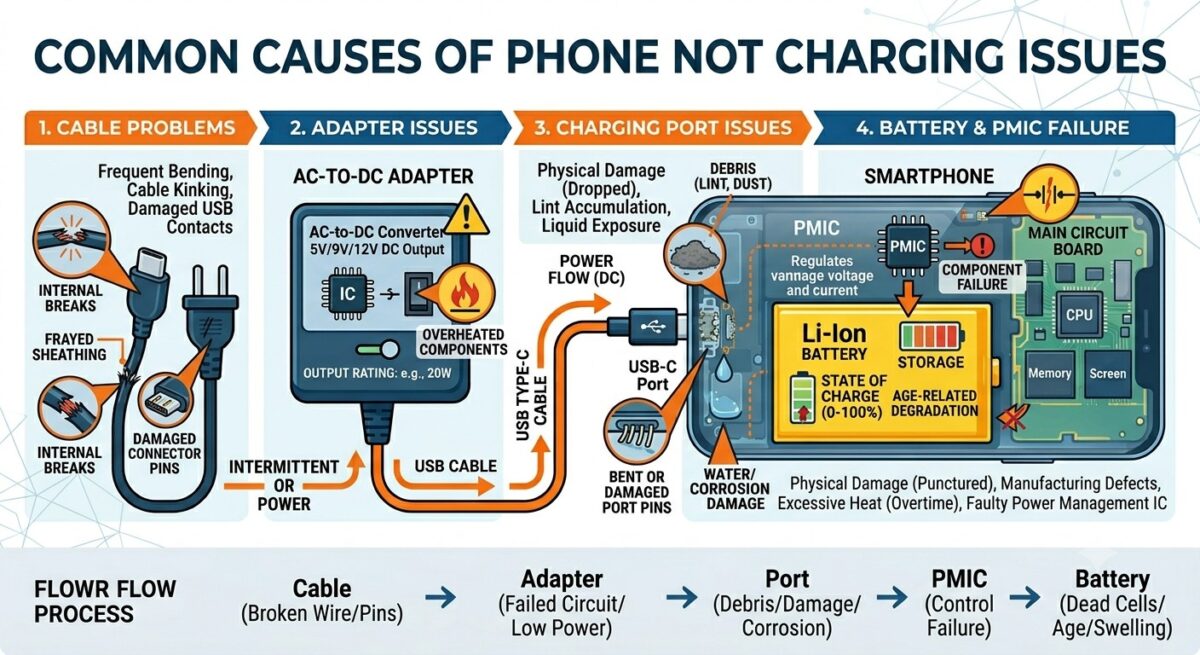
There are several possible reasons behind charging failure. Let’s go through each one in detail.
1. Faulty Charging Cable (Most Common Issue)
One of the most frequent causes of charging issues is a damaged or low-quality charging cable.
Charging cables are used daily and are constantly bent, twisted, and pulled. Over time, this causes internal wire damage that is not visible from outside.
Signs of a faulty cable:
- Charging only works when cable is held at an angle
- Charging stops randomly
- Slow charging speed
- Cable looks bent or frayed
Solution:
Try using:
- A different certified charging cable
- Original manufacturer cable (Apple, Samsung, etc.)
- Another charging adapter
If your phone starts charging normally, the cable was the issue.
2. Damaged or Weak Charging Adapter
Sometimes the problem is not the cable but the power adapter (plug). Adapters can fail internally due to overheating or poor build quality.
Symptoms:
- Phone does not respond when plugged in
- Charging works on some outlets but not others
- Very slow charging
Fix:
- Try another wall adapter
- Use a certified fast charger
- Avoid cheap, unbranded chargers
Low-quality chargers are one of the biggest causes of long-term battery damage in phones.
3. Dirty or Blocked Charging Port
Dust and lint buildup inside the charging port is a very common issue, especially in pocket-carried phones.
Over time, small particles block the connection between cable and port.
Signs of a dirty port:
- Charger feels loose
- Charging disconnects easily
- Cable does not fully insert
- Intermittent charging
Safe cleaning method:
- Use a soft brush
- Use compressed air
- Gently remove lint
Avoid using pins or metal objects as they can permanently damage the charging pins. In many Charging Port Repair cases, simple cleaning resolves the issue completely.
4. Battery Degradation
All smartphone batteries degrade over time. Lithium-ion batteries have a limited number of charging cycles. As the battery ages, it loses its ability to hold charge efficiently.
Common symptoms:
- Phone drains quickly
- Charging stuck at certain percentage
- Random shutdowns
- Overheating during charging
This is very common in older devices such as:
- Older iPhone models
- Samsung Galaxy S series (older generations)
- Google Pixel 3 / 4 series
- Huawei older flagship phones
In such cases, battery replacement is usually the most effective solution.
5. Software-Related Charging Issues
Not all charging problems are hardware-related. Sometimes the operating system causes charging failure. Software manages how power is distributed to the battery. A bug or corrupted update can interrupt this process.
Possible software issues:
- System freeze
- Background apps consuming power
- Battery calibration errors
- Failed updates
Quick fixes:
- Restart your phone
- Update system software
- Close all background apps
- Perform a soft reset
Many temporary charging issues are fixed just by restarting the device.
6. Overheating Protection Mode
Modern smartphones are designed with safety features. If your phone becomes too hot, it may temporarily stop charging. This protects internal components from damage.
Why overheating happens:
- Heavy gaming while charging
- Using phone under direct sunlight
- Faulty battery
- Fast charging stress
Solution:
- Let the phone cool down
- Avoid using while charging
- Remove phone case during charging
Once temperature normalizes, charging usually resumes.
7. Moisture or Water Detection
Many modern devices (especially Samsung and iPhones) have built-in moisture detection systems. If moisture is detected in the charging port, charging is automatically blocked.
Warning messages:
- “Moisture detected”
- “Charging paused”
- “Unplug charger”
What to do:
- Leave phone in a dry place
- Do not use heat (hair dryer, etc.)
- Wait for natural drying
This feature protects your device from short circuits.
8. Faulty Charging Port (Hardware Damage)
If none of the above solutions work, the charging port itself may be damaged. This is very common in phones that are:
- 2-4 years old
- Frequently charged
- Exposed to dust or moisture
Signs of port damage:
- Loose connection
- No charging at all
- Works only at specific angles
- Visible physical damage
At this stage, professional Phone Charging Port Repair is usually required.
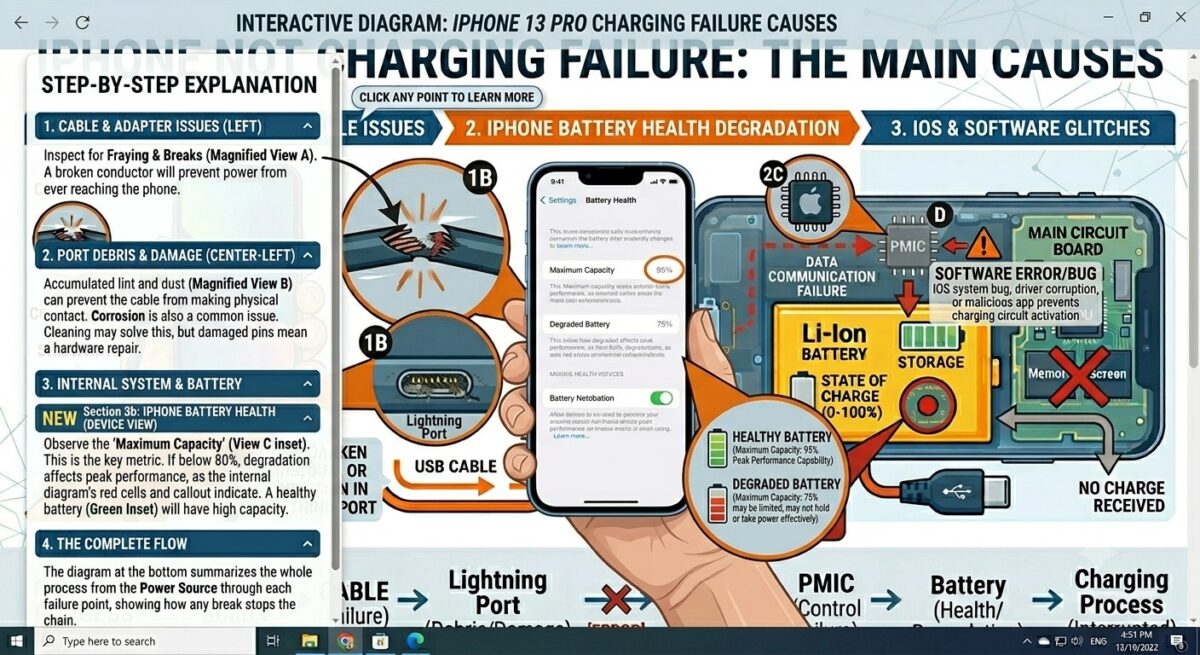
Why Your iPhone Is Not Charging (Detailed Guide)
iPhone charging issues are very common, especially in devices that are more than 2–3 years old. Apple devices are highly optimized, so when charging problems occur, they are usually related to hardware wear or port issues rather than major software faults.
1. Lightning Port Blockage
One of the biggest reasons an iPhone stops charging is dust and lint inside the Lightning port.
Because iPhones are often carried in pockets, debris gradually builds up and prevents proper connection between the cable and port.
Symptoms:
- Cable does not fit properly
- Charging disconnects easily
- Phone charges only when cable is moved
Fix:
Careful cleaning with a soft brush or compressed air may solve the issue. Avoid metal tools as they can damage internal pins.
2. Battery Health Degradation
Apple provides a “Battery Health” feature in settings. Once battery health drops below 80%, charging issues become more noticeable.
Common signs:
- Rapid battery drain
- Unexpected shutdowns
- Slow charging performance
Solution:
Battery replacement is usually required for long-term fix.
Professional iPhone Repair services often diagnose this quickly.
3. iOS Software Glitches
Sometimes iOS updates cause temporary charging bugs.
Fix:
- Restart iPhone
- Update to latest iOS version
- Reset settings if needed
Why Your Samsung Phone Is Not Charging
Samsung devices come with advanced fast charging and USB-C technology. However, they also have specific charging-related issues.
1. Moisture Detection Issue
Samsung phones often stop charging when moisture is detected in the USB-C port.
Warning message:
- “Moisture detected in charging port”
Solution:
- Keep phone in dry environment
- Wait for natural drying
- Avoid heat or hair dryers
2. Fast Charging Not Working
Fast charging may stop due to:
- Non-certified charger
- Damaged USB-C cable
- Software settings disabled
- Battery degradation
Fix:
Enable fast charging in settings and use original Samsung charger.
3. USB-C Port Wear
USB-C ports wear out over time due to frequent use.
Symptoms:
- Loose connection
- Cable falls out easily
- Charging stops randomly
This often requires professional Samsung Phone Repair service.
Why Your Huawei Phone Is Not Charging
Before diving into Huawei-specific issues, note that Huawei’s SuperCharge 2.0 supports up to 40W – using a standard 5W charger alone can reduce charging speed by up to 80%.
Huawei devices use SuperCharge technology, which requires compatible accessories.
Using third-party chargers often causes:
- Slow charging
- No charging
- Interrupted charging
Always use Huawei-certified chargers.
2. Battery Aging
Older Huawei phones experience:
- Slow charging
- Fast battery drain
- Overheating
Battery replacement is the most common fix.
3. Charging Port Damage
Frequent charging causes port wear and tear.
Professional Huawei Repair services can replace damaged ports safely.
Why Your Google Pixel Is Not Charging
Google Pixel phones are software-focused devices, but charging issues still occur. Note: Pixel’s Adaptive Charging feature deliberately slows charging overnight – this is normal, not a fault.
1. USB-C Debris Blockage
Even small dust particles can block charging pins.
Symptoms:
- Charging only at certain angles
- Slow charging
2. Software Updates
Android updates sometimes introduce charging bugs.
Fix:
- Restart device
- Install latest update
- Safe mode testing
3. Hardware Failure
If charging still fails, the issue may be:
- Battery failure
- Charging IC issue
- Port damage
Professional Google Pixel Repair is required.
Advanced Troubleshooting Steps
If your phone still does not charge, try these advanced methods:
1. Force Restart Device
Force restarting your device resets the power system without deleting any data. iPhone 8 or later: Press Volume Up → Press Volume Down → Hold Side button for 10 seconds until Apple logo appears. Samsung Galaxy: Hold Power + Volume Down together for 8 seconds until screen restarts. Huawei: Hold Power button for 10–15 seconds until device restarts. Google Pixel: Hold Power button for 30 seconds or until phone restarts.
2. Try Wireless Charging (If Available)
If your phone supports wireless charging, place it on a wireless charging pad and see if it responds.
If wireless charging works but wired charging does not, this confirms the problem is specifically with your charging port – not the battery or software. In this case, a charging port repair is the next step.
If wireless charging also fails, the issue is likely deeper – either the battery or an internal hardware fault.
3. Check Charging Temperature
Most smartphones are designed to charge only within a safe temperature range – typically between 0°C and 35°C.
If your phone was left in a cold car, near a heater, or under direct sunlight, it may refuse to charge until it returns to normal room temperature. Simply bring it indoors, wait 10 minutes, and try charging again. Do not use a hair dryer or any heat source to speed up the process.
4. Test Different Power Sources
Not all power sources deliver the same charging speed or stability.
Try these in order:
- Wall socket – always the most reliable option
- Power bank – must be rated 18W or above for effective charging
- Laptop USB port – gives only 5W, too slow for most modern phones; use only as a last resort
If your phone charges on one source but not another, the issue may be with that specific outlet or USB port – not the phone itself.
When You Need Professional Phone Repair
You should visit a repair specialist if:
- Phone does not charge at all
- Multiple chargers fail
- Charging port feels loose
- Battery drains instantly
- Device overheats
- Water damage suspected
A technician can diagnose whether the issue is:
- Charging port failure
- Battery replacement needed
- Motherboard issue
- Charging IC fault
Preventing Future Charging Problems
To avoid charging issues in the future:
- Always use original chargers
- Avoid cheap cables
- Keep charging port clean
- Do not overcharge overnight regularly
- Avoid heat exposure
- Replace damaged cables immediately
Frequently Asked Questions (FAQs)
1. Why is my phone not charging even after changing the charger?
If your phone is still not charging after using a new charger, the issue is usually not the cable or adapter. It is most likely caused by a dirty charging port, internal port damage, battery failure, or software glitch. In such cases, a professional diagnosis is recommended because the fault is inside the device, not the accessories.
2. How do I fix a phone that is not charging at all?
To fix a completely unresponsive charging issue, try these steps in order:
- Restart your phone
- Try a different original charger
- Clean the charging port carefully
- Test another power socket
- Leave the phone to cool down if overheated
If none of these work, the problem may be hardware-related such as the charging port or battery, which requires repair.
3. Can a dead battery stop my phone from charging?
Yes. A severely degraded or “dead” battery may fail to accept charge properly. In this situation, your phone may:
- Stay at 0%
- Restart repeatedly
- Show charging but not increase percentage
Battery replacement is usually required to solve this issue permanently.
4. How much does phone charging port repair cost in the UK?
In the UK, charging port repair costs depend on the device and damage level. On average:
- Basic cleaning: £20 – £40
- Minor repair: £40 – £70
- Full charging port replacement: £60 – £120
- Premium devices (iPhone, Samsung, Google Pixel): £80 – £150+
If other issues like battery or motherboard damage are involved, the cost may be higher after diagnosis.Prices are approximate as of 2024/2025 and may vary by location and device model.
5. Why does my phone charge only sometimes?
Intermittent charging usually means the charging port is loose or damaged. It can also happen due to:
- Broken internal connector pins
- Faulty cable connection
- Dirt inside the port
- Motherboard charging IC issues
If your phone charges only at a specific angle, it is a strong sign of charging port failure.
6. Is it safe to use my phone while charging?
Yes, it is generally safe, but heavy usage (gaming, video recording, hotspot use) can cause overheating. Overheating may slow down charging or temporarily stop it for safety reasons. It is always better to charge the phone without heavy usage for optimal battery health.
7. Why is my phone charging very slowly?
Slow charging can be caused by a faulty cable, low-quality charger, background apps, battery degradation, or a damaged charging port. Using an original fast charger often improves charging speed.
8. Can a dirty charging port stop charging completely?
Yes. Dust, lint, and debris can block the charging connection and stop the phone from charging or cause intermittent charging issues.
9. How long does a phone charging port repair take?
Most charging port repairs take between 30 minutes to 2 hours, depending on the device model and complexity of the issue.
10. When should I visit a phone repair shop?
You should visit a repair shop if:
- Phone does not charge at all
- Charging is inconsistent
- Multiple chargers have been tested
- Device overheats during charging
In such cases, professional diagnosis is the safest option.
Conclusion
Phone charging problems are frustrating – but rarely unfixable. Start with the simplest fix first. Change your cable. If that does not work, clean the charging port carefully. Still no improvement? Try a different adapter, restart your device, or let it cool down if overheating.
If you have tried everything and your phone still refuses to charge, that is your signal to stop guessing and get a professional opinion. At that point, the issue is almost always one of three things – a damaged charging port, a worn-out battery, or an internal charging fault – and all three are repairable.
The longer you wait, the worse it can get. A small port issue left unattended can become a motherboard problem. An aging battery pushed too far can swell and cause serious damage. Most repairs at iExpert Repairs are completed same day. Our certified technicians diagnose the exact fault first – so you only pay for what actually needs fixing.
Book a free diagnosis at iExpert Repairs today.
Looking for a quality refurbished phone instead? Visit iExpert Market for fully tested, affordable refurbished iPhones and Samsung devices – all backed by warranty.