How Much Does a Laptop Battery Replacement Cost in the UK?
A failing laptop battery can quickly turn a reliable device into a frustrating one. If your laptop only works while plugged in, loses power within minutes, shuts down unexpectedly, or refuses to charge properly, there’s a good chance the battery has reached the end of its lifespan.
One of the first questions most people ask is, “How much does a laptop battery replacement cost in the UK?” The answer depends on several factors, including your laptop brand, model, battery type, and whether you choose a genuine OEM battery or a high-quality compatible replacement. Labour costs, warranty, and the complexity of the repair can also influence the final price.
The good news is that replacing a worn-out battery is usually far more affordable than buying a new laptop. In many cases, a professional battery replacement can restore battery life, improve portability, and extend your laptop’s lifespan by several years.
In this complete UK price guide, you’ll learn the average cost of replacing a laptop battery, how prices vary between different brands, the warning signs of a failing battery, and when it’s worth repairing your laptop instead of replacing it. We’ll also explain what affects battery replacement costs, how long the repair usually takes, and how to choose a trusted repair service in the UK.
Laptop Battery Replacement Cost at a Glance
| Category | Details |
|---|---|
| Average Laptop Battery Replacement Cost (UK) | £60-£220+ |
| Typical Repair Time | 30 minutes to 2 hours |
| Battery Lifespan | Around 3-5 years (300-1,000 charge cycles) |
| Can You Replace It Yourself? | Yes, on some older laptops. Most modern laptops require professional replacement. |
| Is It Worth Replacing? | Yes, if the laptop is otherwise in good working condition. |
| Warranty Available? | Most professional repairs include a warranty on the replacement battery. |
Quick Answer
In the UK, a laptop battery replacement typically costs between £60 and £220, depending on the laptop brand, model, battery type, and the complexity of the installation. Standard Windows laptops are generally less expensive to repair, while premium ultrabooks and Apple MacBooks often cost more due to integrated battery designs and higher-quality replacement parts.
If your laptop battery drains quickly, won’t charge, or only works while connected to the charger, replacing the battery is usually the most cost-effective solution. However, if your laptop still won’t power on after replacing or charging the battery, the problem may be related to the charging port, power adapter, or motherboard rather than the battery itself. In such cases, a professional diagnostic can identify the exact cause before unnecessary parts are replaced.
Average Laptop Battery Replacement Cost in the UK
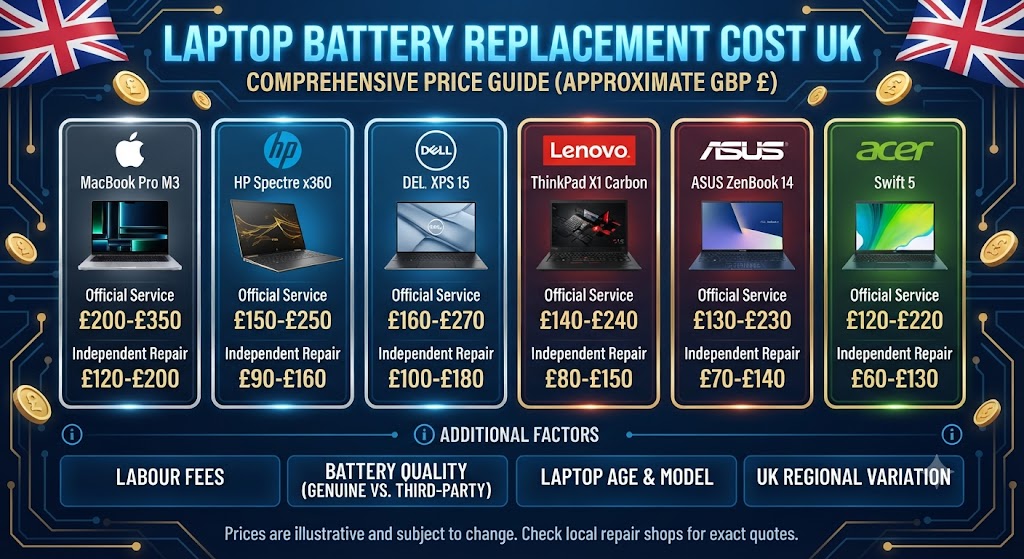
The cost of replacing a laptop battery can vary significantly depending on the manufacturer, battery capacity, and whether the battery is removable or built into the laptop. While older laptops often have batteries that are quick and inexpensive to replace, many modern ultrabooks and premium devices require partial disassembly, increasing labour time and repair costs.
As a general guide, most laptop battery replacements in the UK cost between £60 and £220, including the replacement battery and professional installation. Budget laptops usually fall at the lower end of the price range, while premium business laptops, gaming laptops, and Apple MacBooks are typically more expensive because of their integrated battery designs and higher-quality components.
The table below provides an overview of typical battery replacement costs for different laptop categories in the UK.
| Laptop Type | Average UK Battery Replacement Cost |
|---|---|
| Budget Windows Laptops | £60-£100 |
| HP, Dell & Lenovo Laptops | £70-£140 |
| ASUS & Acer Laptops | £70-£150 |
| Gaming Laptops | £90-£180 |
| Microsoft Surface Devices | £120-£220+ |
| Apple MacBook Air | £120-£220 |
| Apple MacBook Pro | £150-£300+ |
Laptop Battery Replacement Cost by Brand
Although the average cost of replacing a laptop battery in the UK falls between £60 and £220, the actual price depends largely on the manufacturer and model of your device. Some laptops have removable batteries that can be replaced within minutes, while others use built-in batteries that require the laptop to be partially dismantled before the new battery can be installed.
Below is a breakdown of the average battery replacement costs for some of the most popular laptop brands in the UK.
1. HP Laptop Battery Replacement Cost
HP laptops are among the most commonly repaired devices in the UK. Depending on the model, replacing an HP laptop battery typically costs between £70 and £140. Older Pavilion models often have removable batteries, making the replacement quicker and more affordable, whereas newer Spectre and EliteBook models usually feature integrated batteries that require additional labour.
Common signs that your HP battery may need replacing include:
- The battery drains unusually quickly.
- The laptop only works when connected to the charger.
- Windows displays a battery service warning.
- The battery percentage jumps suddenly.
- Unexpected shutdowns during normal use.
If your HP laptop still doesn’t power on after charging, the issue may not be the battery itself. Problems with the charging port or internal power circuit can produce similar symptoms. In those cases, our HP Laptop Repair service can help identify the exact cause before any parts are replaced.
2. Dell Laptop Battery Replacement Cost
For most Dell Inspiron, Latitude, XPS, and Precision laptops, battery replacement generally costs between £70 and £150, depending on the battery type and model. Dell batteries naturally lose capacity after hundreds of charge cycles, making them one of the most common laptop components to wear out over time.
Typical battery problems include:
- Rapid battery drain
- Laptop shutting down below 20% battery
- Battery not charging to 100%
- “Battery Health” warning messages
- Reduced battery runtime
If your Dell laptop is also running slower than usual, it’s worth checking whether ageing hardware is affecting overall performance. Our guide on How to Fix a Slow Laptop explains other common causes of poor laptop performance beyond battery-related issues.
3. Lenovo Laptop Battery Replacement Cost
Replacing the battery in a Lenovo laptop usually costs between £70 and £150. Premium ThinkPad, Yoga, and Legion gaming models may cost more because of their larger batteries and more complex internal designs.
Signs your Lenovo battery may be failing include:
- Battery charging very slowly
- Laptop switching off without warning
- Reduced battery life after a full charge
- Battery not detected by Windows
- Charging stops at a fixed percentage
If your Lenovo laptop refuses to charge altogether, the problem could also involve the charging port or power management system rather than the battery alone. Our Lenovo Laptop Repair specialists can accurately diagnose the fault before recommending a replacement.
4. ASUS Laptop Battery Replacement Cost
Battery replacement for ASUS laptops generally ranges from £70 to £160, depending on whether you own a VivoBook, ZenBook, ExpertBook, or ROG gaming laptop. ASUS gaming laptops often use higher-capacity batteries, making replacement costs slightly higher than standard office laptops.
Some common warning signs include:
- Short battery life
- Charging interruptions
- Laptop overheating while charging
- Battery swelling
- Random shutdowns
Overheating is one of the leading causes of premature battery wear. If your laptop becomes excessively hot during everyday use, it’s worth reading our How to Fix Laptop Overheating guide to help prevent further damage and extend battery life.
5. Acer Laptop Battery Replacement Cost
For most Acer Aspire, Swift, Nitro, and Predator laptops, battery replacement usually costs between £70 and £150. Although Acer batteries are generally reliable, daily charging, heat, and age eventually reduce their performance.
Typical symptoms include:
- Battery drains within an hour
- Charging takes much longer than normal
- Battery health declines rapidly
- Laptop unexpectedly powers off
Replacing the battery early can often restore portability and prevent unnecessary strain on the charging system.
6. Microsoft Surface Battery Replacement Cost
Microsoft Surface devices are among the most difficult laptops to repair because the battery is securely bonded inside the device. As a result, battery replacement generally costs between £120 and £220+.
Professional replacement is strongly recommended because attempting to remove the battery without specialist tools can damage the display or internal components. Common Surface battery issues include:
- Battery swelling
- Device becoming unusually hot
- Poor battery life
- Charging problems
- Unexpected shutdowns
Because of the complexity of Surface devices, accurate diagnostics are essential before replacing the battery.
7. MacBook Battery Replacement Cost
MacBook battery replacement costs are generally higher than standard Windows laptops due to Apple’s integrated battery design and the specialist repair process involved.
Typical UK prices include:
| MacBook Model | Average Battery Replacement Cost |
|---|---|
| MacBook Air | £120-£220 |
| MacBook Pro 13-inch | £150-£250 |
| MacBook Pro 14-inch | £180-£300+ |
| MacBook Pro 16-inch | £220-£350+ |
Common signs your MacBook battery needs replacing include:
- “Service Recommended” battery warning
- Battery drains rapidly
- Unexpected shutdowns
- Swollen battery
- MacBook only works while plugged in
If your MacBook isn’t powering on at all, the issue may extend beyond the battery to the charging system or logic board. In these situations, our MacBook Repair specialists can carry out a full diagnostic to determine the exact fault before any repair work begins.
Technician Insight
One of the biggest mistakes we see is customers purchasing a replacement battery online before confirming that the battery is actually the problem. In our repair experience, charging port faults, damaged power adapters, and motherboard issues often produce the same symptoms as a failing battery. A professional diagnostic helps ensure the correct fault is repaired first, saving both time and unnecessary expense.
Factors That Affect Laptop Battery Replacement Cost in the UK
Not every laptop battery replacement costs the same. The final price depends on several important factors, including your laptop’s brand, model, battery type, labour costs, and whether genuine or compatible replacement parts are used. Understanding these factors helps you estimate the repair cost more accurately and avoid paying more than necessary.
Below are the biggest factors that influence laptop battery replacement prices across the UK.
1. Laptop Brand and Model
The make and model of your laptop is one of the biggest factors affecting the replacement cost. Premium laptops often use specialised batteries that are more expensive to source and install than standard models. For example:
- Apple MacBook batteries generally cost more because they are integrated into the chassis and require specialist tools.
- Dell business laptops often have premium battery options depending on the series.
- HP and Lenovo replacement batteries vary widely between consumer and business models.
- ASUS, Acer, Samsung, MSI, and gaming laptops may use high-capacity batteries designed for better performance.
Newer laptops usually have more complex internal designs, which can increase labour costs compared to older models.
2. Battery Type
Laptop batteries are not all the same. Different battery technologies and designs directly affect replacement costs. Common battery types include:
- Standard Lithium-ion (Li-ion)
- Lithium Polymer (Li-Po)
- Internal sealed batteries
- Removable batteries (older laptops)
- High-capacity extended batteries
Built-in batteries generally take longer to replace because technicians must carefully remove the bottom casing and disconnect internal components.
3. Original (OEM) vs Compatible Battery
The quality of the replacement battery also affects the total repair cost. OEM (Original Equipment Manufacturer) batteries are designed to match the original specifications of your laptop and usually provide the best reliability, safety, and lifespan. High-quality compatible batteries are often a more affordable alternative while still delivering excellent performance when sourced from reputable suppliers.
Very cheap batteries may seem attractive, but they often:
- Hold less charge
- Wear out faster
- Cause charging problems
- Offer lower safety standards
- Come with little or no warranty
Choosing quality parts usually saves money over the long term.
4. Labour Charges
Replacing a battery isn’t always a simple job. Some older laptops allow the battery to be swapped in minutes, while modern ultrabooks and premium laptops require careful disassembly.
Labour costs usually depend on:
- Internal battery design
- Device complexity
- Required repair time
- Specialist tools
- Technician experience
Professional installation also reduces the risk of damaging delicate components during the repair.
5. Laptop Age
Older laptops sometimes cost more to repair – not because the repair itself is difficult, but because replacement batteries may be harder to source. Manufacturers eventually discontinue certain battery models, making genuine replacements less available.
In contrast, batteries for newer laptops are generally easier to find but may still command premium prices due to their advanced technology.
6. Battery Capacity
Battery capacity is measured in Watt-hours (Wh) or mAh (milliamp-hours). Higher-capacity batteries usually:
- Last longer between charges
- Cost more to manufacture
- Increase the replacement price
This is particularly common with gaming laptops, mobile workstations, and premium business laptops that require larger batteries to support powerful hardware.
7. Repair Provider
Where you have your laptop repaired also affects the overall cost. Prices can vary depending on whether you choose:
- Independent laptop repair specialists
- National repair centres
- Manufacturer-authorised repair providers
- Local computer repair shops
While lower prices may seem appealing, it’s important to consider the quality of replacement parts, technician experience, warranty, and aftercare – not just the upfront cost. Choosing an experienced repair provider often results in better long-term value and fewer repeat repairs.
Average Laptop Battery Replacement Costs by Brand
Although prices vary between individual models, the table below provides a realistic estimate of what UK customers can typically expect to pay.
| Laptop Brand | Typical UK Battery Replacement Cost |
|---|---|
| Apple MacBook Air | £120-£250 |
| Apple MacBook Pro | £150-£300+ |
| HP Laptop | £70-£170 |
| Dell Laptop | £70-£180 |
| Lenovo Laptop | £70-£180 |
| ASUS Laptop | £70-£170 |
| Acer Laptop | £65-£160 |
| Microsoft Surface Laptop | £140-£280 |
| Samsung Laptop | £70-£170 |
| MSI Gaming Laptop | £90-£220 |
Expert Tip: Battery prices vary depending on the exact model, battery capacity, and parts availability. A professional diagnostic ensures you receive the correct battery for your specific laptop.
How Long Does a Laptop Battery Usually Last?
Before paying for a replacement, it’s worth understanding the average lifespan of a laptop battery. Most modern laptop batteries last between 3 and 5 years, or approximately 300 to 1,000 full charge cycles, depending on the manufacturer and how the device is used.
Heavy workloads such as gaming, video editing, or running demanding software can shorten battery life more quickly than everyday browsing or office work. If your laptop battery drains rapidly, struggles to hold a charge, or shuts down unexpectedly, replacing the battery is often a more cost-effective solution than replacing the entire laptop.
Signs Your Laptop Battery Needs Replacing
Laptop batteries gradually lose their ability to hold a charge as they age. While battery performance naturally declines over time, there are several warning signs that indicate it may be time for a replacement. Recognising these symptoms early can help you avoid unexpected shutdowns, protect your data, and keep your laptop performing reliably.
Here are the most common signs that your laptop battery may need replacing.
1. Battery Drains Very Quickly
One of the clearest signs of battery wear is a significant reduction in battery life. If your laptop previously lasted six to eight hours on a full charge but now only runs for one or two hours, the battery has likely lost much of its original capacity.
This gradual decline is normal after years of regular charging and discharging.
2. Laptop Only Works When Plugged In
If your laptop immediately turns off when you unplug the charger, even after showing a full battery, the battery is usually no longer capable of storing power. In many cases, replacing the battery restores normal portable use without affecting any of your files or software.
3. Battery Percentage Changes Suddenly
An ageing battery often provides inaccurate charge readings. You may notice the battery percentage:
- Drops from 70% to 20% within minutes
- Jumps back up unexpectedly
- Shows 100% but quickly falls after unplugging
- Changes erratically without heavy usage
These inaccurate readings usually indicate that the battery cells have deteriorated.
4. Unexpected Shutdowns
If your laptop suddenly switches off without warning while the battery still shows remaining charge, the battery may no longer be supplying stable power. Random shutdowns can interrupt important work and may even increase the risk of file corruption if documents haven’t been saved.
5. Battery Won’t Charge to 100%
Some batteries eventually stop charging beyond a certain percentage. For example, your laptop may become stuck at:
- 55%
- 70%
- 85%
- 95%
Although software or charging issues can sometimes cause this behaviour, an ageing battery is often the underlying reason.
6. Windows Displays a Battery Warning
Windows can detect battery health problems and may display notifications such as:
- “Consider replacing your battery.”
- “Battery health significantly reduced.”
- “Battery capacity has deteriorated.”
These warnings should not be ignored, as they usually indicate that the battery has reached the end of its useful lifespan.
7. Battery Swelling
A swollen battery is a serious safety issue and requires immediate attention. Signs include:
- Bulging underneath the laptop
- Keyboard lifting upwards
- Trackpad becoming difficult to click
- Gaps appearing around the laptop casing
- Bottom cover no longer fitting properly
If you notice any swelling, stop using the laptop immediately and avoid attempting to puncture or press the battery. Professional replacement is the safest solution.
8. Laptop Becomes Unusually Hot
Although overheating isn’t always caused by the battery, failing battery cells can generate excessive heat during charging or heavy use. If your laptop consistently feels hotter than usual while charging, the battery should be inspected as soon as possible.
How to Check Laptop Battery Health
1. Check Battery Health on Windows
Windows includes a built-in Battery Report feature. Follow these steps:
- Open Command Prompt as Administrator.
- Type:
powercfg /batteryreport- Press Enter.
- Open the generated battery report in your browser.
The report includes:
- Original battery capacity
- Current full charge capacity
- Charge cycle count
- Battery usage history
- Estimated battery life
If the current full charge capacity is significantly lower than the original design capacity, your battery is likely nearing the end of its lifespan.
2. Check Battery Health on MacBook
MacBook users can quickly view battery health through macOS.
Go to:
Apple Menu → System Settings → Battery → Battery Health
Depending on your macOS version, you may see messages such as:
- Normal
- Service Recommended
If macOS recommends servicing the battery, it’s usually time to consider a replacement.
Can You Replace a Laptop Battery Yourself?
The answer depends on your laptop model. Older laptops often have removable batteries that can be replaced within minutes without opening the device.
However, most modern laptops – including MacBooks, ultrabooks, Microsoft Surface devices, and many HP, Dell, Lenovo, ASUS, and Acer models – use internal batteries secured with screws and delicate connectors.
DIY replacement may seem straightforward, but there are risks, including:
- Damaging internal cables
- Breaking plastic clips
- Installing the wrong battery
- Causing charging issues
- Accidentally damaging the motherboard
For this reason, many users choose professional installation to ensure the battery is fitted correctly and safely.
If your laptop still won’t power on even after replacing or charging the battery, the problem may be related to another hardware component. Our guide on Why Is My Laptop Not Turning On? explains how to diagnose charging issues, motherboard faults, RAM problems, and other common startup failures before considering more extensive repairs.
Is It Worth Replacing a Laptop Battery or Buying a New Laptop?
One of the most common questions people ask is whether it’s worth replacing a worn-out battery or investing in a brand-new laptop. In many cases, replacing the battery is the more cost-effective option – especially if the laptop still performs well and meets your daily needs.
A professional battery replacement can significantly extend your laptop’s lifespan, improve portability, and delay the expense of purchasing a new device.
1. When Replacing the Battery Makes Sense
A battery replacement is usually the best option if:
- Your laptop runs well when plugged into the charger.
- The battery no longer holds a charge.
- The device is less than five or six years old.
- The screen, keyboard, and motherboard are in good condition.
- You only need longer battery life for work, study, or travel.
Replacing the battery is often much cheaper than buying a new laptop and allows you to continue using a device you’re already familiar with.
2. When Buying a New Laptop May Be the Better Choice
In some situations, replacing the battery isn’t the most economical solution. You may want to consider upgrading if:
- Your laptop is over seven or eight years old.
- Multiple hardware components have failed.
- The motherboard requires expensive repairs.
- The laptop is too slow for your daily workload.
- Replacement parts are no longer available.
- The total repair cost approaches the value of the laptop.
If your device requires both a battery replacement and several other major repairs, upgrading may provide better long-term value.
Repair vs Replace: Quick Comparison
| Situation | Best Choice |
|---|---|
| Battery no longer holds charge | Replace the battery |
| Laptop works perfectly when plugged in | Replace the battery |
| Laptop is under 5 years old | Replace the battery |
| Battery is swollen | Replace immediately |
| Motherboard and battery both faulty | Compare repair costs |
| Laptop has several major hardware faults | Consider upgrading |
| Repair cost exceeds laptop value | Buy a refurbished or new laptop |
How Long Does a Laptop Battery Replacement Take?
Most laptop battery replacements are completed much faster than many people expect. The repair time depends on the laptop model, battery availability, and whether additional repairs are required.
Typical turnaround times include:
| Repair Type | Estimated Time |
|---|---|
| External removable battery replacement | 10-30 minutes |
| Internal laptop battery replacement | 1-3 hours |
| MacBook battery replacement | Same day to 2 days |
| Battery replacement with diagnostic testing | 1-2 days |
| Battery requiring special order | 2-5 working days |
Many professional repair centres also perform battery health checks, charging tests, and overall system diagnostics before returning the laptop to ensure everything is working correctly.
Tips to Make Your New Laptop Battery Last Longer
After replacing your battery, adopting a few simple habits can help maximise its lifespan and maintain long-term performance.
1. Charge Smart
Avoid leaving your laptop plugged in continuously for weeks at a time. Occasional battery cycling helps maintain healthy battery performance.
2. Keep Your Laptop Cool
Heat is one of the biggest causes of battery degradation. Use your laptop on a hard, flat surface and keep the cooling vents free from dust.
3. Use the Correct Charger
Always use the manufacturer’s charger or a high-quality compatible adapter that meets the correct voltage and wattage requirements.
4. Reduce Unnecessary Power Usage
Lowering screen brightness, closing unused applications, and enabling battery-saving modes can reduce strain on the battery and extend runtime.
5. Keep Software Updated
Operating system and BIOS updates often include battery management improvements that help optimise charging performance and overall efficiency.
Professional Tip from Our Laptop Repair Specialists
Many customers assume their battery needs replacing when the actual problem is a faulty charger, damaged charging port, motherboard fault, or power management issue.
A professional diagnostic can quickly determine whether the battery is genuinely worn out or if another component is preventing the laptop from charging correctly. This helps avoid unnecessary replacement costs and ensures the correct repair is carried out the first time.
FAQs About Laptop Battery Replacement Cost
1. How much does a laptop battery replacement cost in the UK?
The average laptop battery replacement cost in the UK ranges from £60 to £180, depending on your laptop’s brand, model, battery type, and the labour required. Premium laptops such as MacBooks and high-performance gaming laptops often cost more due to specialised batteries and complex installation procedures.
2. Why does laptop battery replacement cost vary between brands?
Laptop battery replacement costs vary because different manufacturers use different battery designs, capacities, and installation methods. For example, replacing a removable battery is usually quicker and less expensive than replacing an internal battery that requires dismantling the laptop.
3. How much does a MacBook battery replacement cost in the UK?
A MacBook battery replacement typically costs between £120 and £300+ in the UK, depending on whether you own a MacBook Air or MacBook Pro and the specific model year. Premium-quality replacement batteries and professional installation help ensure long-term performance and safety.
4. How much does an HP laptop battery replacement cost?
Most HP laptop battery replacements cost between £60 and £150, although premium business models and gaming laptops may cost more due to higher-capacity batteries and additional labour.
5. How much does a Dell laptop battery replacement cost?
Dell laptop battery replacement usually costs between £70 and £170 in the UK. The final price depends on the laptop series, battery type, and whether an original or OEM-grade replacement battery is used.
6. How much does a Lenovo laptop battery replacement cost?
Replacing a Lenovo laptop battery generally costs between £70 and £170. ThinkPad, Yoga, and Legion models may require more specialised batteries, increasing the overall repair cost.
7. Is replacing a laptop battery cheaper than buying a new laptop?
Yes. In most cases, replacing a faulty laptop battery is significantly more affordable than purchasing a new laptop. If your laptop is otherwise performing well, a battery replacement can extend its lifespan by several years at a fraction of the cost of replacement.
8. How long does a laptop battery replacement take?
A standard laptop battery replacement usually takes 30 minutes to 2 hours, depending on the laptop model. Some repairs can even be completed on the same day if replacement parts are readily available.
9. What are the signs that my laptop battery needs replacing?
Common signs include rapid battery drain, the laptop only working while plugged in, unexpected shutdowns, overheating, battery warning messages, slow charging, or a swollen battery. These symptoms often indicate that the battery has reached the end of its lifespan.
10. Can I replace a laptop battery myself?
Some laptops with removable batteries allow simple DIY replacement. However, most modern laptops have built-in batteries that require specialist tools and technical knowledge. Professional replacement is recommended to avoid accidental damage to internal components.
11. How long does a laptop battery usually last?
Most laptop batteries last between 3 and 5 years or approximately 300-1,000 charge cycles, depending on the battery type, usage habits, charging patterns, and overall device maintenance.
12. Is it safe to keep using a swollen laptop battery?
No. A swollen laptop battery can pose a serious safety risk, including overheating, leakage, or fire. If your battery appears swollen, stop using the laptop immediately and arrange a professional battery replacement as soon as possible.
13. Will replacing my laptop battery improve performance?
A new battery won’t directly increase processing speed, but it can improve stability, eliminate unexpected shutdowns, restore normal battery life, and ensure your laptop performs reliably when unplugged.
14. Does replacing a laptop battery erase my data?
No. A battery replacement does not affect your files, applications, or operating system because your data is stored on the SSD or hard drive rather than the battery.
15. Should I choose an original or OEM-grade replacement battery?
A high-quality OEM-grade or genuine replacement battery is generally the best choice because it provides better safety, reliability, charging performance, and longer lifespan compared to low-quality third-party batteries.
Why Choose iExpert Repairs for Laptop Battery Replacement?
Choosing the right repair provider is just as important as choosing the right replacement battery. A low-quality battery or incorrect installation can lead to charging problems, poor battery life, reduced performance, or even damage to your laptop.
At iExpert Repairs, we combine over 10 years of hands-on repair experience with advanced diagnostic equipment to deliver reliable laptop battery replacement services across the UK. Our technicians don’t simply replace the battery – they first diagnose the underlying issue to confirm whether the battery is actually at fault or if another component, such as the charging port, power adapter, or motherboard, is causing the problem.
We repair laptops from all major manufacturers, including Apple MacBook, Dell, HP, Lenovo, ASUS, Acer, Microsoft Surface, Samsung, MSI, Toshiba, and gaming laptops. Every repair is completed using premium OEM-grade or equivalent replacement batteries wherever possible, followed by comprehensive testing to ensure safe charging, stable performance, and long-lasting reliability.
Why Thousands of UK Customers Trust iExpert Repairs
- Certified laptop repair specialists with 10+ years of experience
- Professional battery diagnostics before every replacement
- Premium OEM-grade or equivalent replacement batteries
- Same-day battery replacements available for many laptop models
- Repairs for MacBook, Dell, HP, Lenovo, ASUS, Acer, Samsung, MSI, Microsoft Surface, Toshiba, and more
- Advanced motherboard and charging circuit diagnostics
- Secure UK-wide mail-in repair service
- Free tracked return delivery
- Transparent pricing with no hidden charges
- 12-month warranty on qualifying repairs
- Fix Now, Pay Later with Klarna
- Trusted nationwide for fast, reliable laptop repairs
Whether your battery no longer holds a charge, your laptop only works while plugged in, or you’re experiencing unexpected shutdowns, our experienced technicians will identify the exact cause and recommend the most cost-effective repair solution.
Looking for a Reliable Refurbished Laptop Instead?
Sometimes replacing a battery isn’t the best investment – especially if your laptop is older, has multiple hardware faults, or the repair cost approaches the value of the device.
If you’re considering an upgrade, iExpert Market offers a wide range of certified refurbished laptops and premium devices that provide excellent performance at a significantly lower price than buying new.
Our refurbished collection includes:
- Refurbished MacBook Air
- Refurbished MacBook Pro
- Refurbished iPhones
- Refurbished Samsung phones
- Refurbished iPads
- Refurbished iPad Air
- Refurbished iPad Pro
- Refurbished iPad mini
- Refurbished Samsung tablets
- Refurbished Windows laptops
- Refurbished tablets from leading brands
Every device is professionally tested, quality checked, securely data-wiped, and backed by a warranty, giving you confidence that you’re purchasing reliable technology that’s built to last. Whether you need a device for work, university, business, or everyday use, iExpert Market makes premium technology more affordable while helping reduce electronic waste.
Back to posts