Introduction
Few things are more frustrating than picking up your phone after a drop and finding the back covered in cracks. The display might still work perfectly, your camera may seem unaffected, and the phone might continue charging as normal. Because everything appears to be working, it’s easy to assume the damage is purely cosmetic.
Unfortunately, that’s not always the case.
The back glass on modern smartphones does much more than improve the phone’s appearance. It helps protect delicate internal components, supports wireless charging on many devices, and works with adhesive seals that improve resistance against dust and moisture. Once that glass cracks, your phone becomes more vulnerable to everyday wear, accidental knocks, and environmental damage.
At iExpert Repairs, we’ve seen countless customers delay repairing cracked back glass because the phone still seemed usable. In many cases, the repair remained straightforward. In others, the original impact had also damaged internal components, leading to more expensive repairs that could have been avoided with earlier inspection.
If your phone developed other problems after being dropped – such as charging issues, poor speaker performance, or an unresponsive touchscreen – the cracked back glass may only be one part of the problem. It’s always worth checking the device thoroughly before deciding on the most suitable repair.
The good news is that a cracked phone back glass can usually be repaired without replacing the entire handset. Whether you own an iPhone, Samsung Galaxy, Google Pixel, or another smartphone, the best solution depends on the extent of the damage, the model of your device, and whether any additional components were affected during the impact.
In this complete guide, you’ll learn what causes phone back glass to crack, whether it’s safe to continue using your device, how professional back glass replacement works, typical repair costs, when DIY repairs are worth considering, and how to prevent the same problem from happening again.
Quick Answer: How to Fix a Cracked Phone Back Glass?
The safest and most effective way to fix a cracked phone back glass is to replace the damaged rear panel with a professionally fitted replacement. While temporary solutions such as applying clear protective film or using a sturdy phone case may prevent the damage from getting worse, they won’t repair the cracked glass itself.
If the damage is limited to a small hairline crack and your phone is working normally, you can usually continue using it for a short period. However, if the rear glass is shattered, lifting away from the frame, or exposing internal components, arranging a professional repair as soon as possible is strongly recommended.
Modern smartphones are designed with wireless charging coils, precision adhesives, camera modules, and waterproof seals located directly beneath the rear glass. Replacing the back glass without the correct tools or experience can easily damage these components, making DIY repairs riskier than many people realise.
What Is a Cracked Phone Back Glass?
A phone’s back glass is the rear panel fitted to many modern smartphones. Unlike older devices that used plastic or aluminium backs, today’s premium smartphones use strengthened glass to support features such as wireless charging, improved signal performance, and premium design.
Although manufacturers use durable materials, no glass is completely resistant to accidental drops or heavy impacts.
A cracked phone back glass can range from a tiny hairline fracture to severe shattering across the entire rear of the device. Some cracks only affect the appearance of the phone, while others weaken its overall structure and increase the risk of additional internal damage.
Many people focus only on whether the screen still works. However, the rear panel also protects several important components inside the device, making it an essential part of the phone rather than simply a decorative cover.
Why Do Modern Smartphones Use Glass Backs?
Glass-backed smartphones have become the industry standard because they provide several practical advantages over metal designs.
| Feature | Benefit |
|---|---|
| Wireless charging support | Glass allows wireless charging to work efficiently. |
| Better antenna performance | Radio signals pass through glass more effectively than metal. |
| Premium finish | Creates the sleek design found on most flagship smartphones. |
| Easier heat distribution | Helps manufacturers balance internal component layouts. |
| Higher resale appeal | Devices in good cosmetic condition generally retain more value. |
Although these advantages improve the overall user experience, they also mean that repairing damaged rear glass has become more specialised than it was a few years ago.
Can You Still Use a Phone with a Cracked Back Glass?
Yes – but whether you should continue using it depends on how severe the damage is.
Many smartphones remain fully functional after the rear glass cracks because the display, battery, cameras, and motherboard haven’t been directly affected. If the damage is only cosmetic, you may be able to use the device temporarily while arranging a repair.
However, a cracked back panel should never be ignored for long. Even small fractures can spread with everyday use, making the phone more vulnerable to moisture, dust, and additional internal damage.
If your phone was dropped hard enough to crack the rear glass, it’s also worth checking whether other components have been affected. Some users later notice charging issues, speaker problems, camera faults, or touch screen problems that weren’t obvious immediately after the impact.
If you experience any of these symptoms, our guides on Why Is My Phone Not Charging?, How to Fix Phone Speaker Issues, and Phone Touch Screen Not Responding can help identify whether the damage extends beyond the back glass.
1. When It’s Usually Safe to Keep Using Your Phone
If all of the following apply, you can normally continue using the phone for a short period until the repair is arranged:
- The crack is small and not spreading rapidly.
- No glass pieces are falling away.
- The display works normally.
- The phone charges correctly.
- Cameras, buttons and speakers function as expected.
- The phone doesn’t become unusually hot after the drop.
Although the device may still be usable, fitting a protective case can help prevent the damage from becoming worse before the repair is completed.
2. When You Should Stop Using It
Some situations require immediate professional attention because continuing to use the phone may increase the damage.
| Condition | Recommendation |
|---|---|
| Rear glass is badly shattered | Arrange repair as soon as possible. |
| Sharp glass edges are exposed | Avoid handling without a protective case. |
| Internal components are visible | Stop using the phone until it’s repaired. |
| Battery appears swollen | Stop using the device immediately. |
| Wireless charging has stopped working after the drop | Have the phone professionally inspected. |
| Phone no longer charges properly | Internal damage may have occurred. |
These symptoms often indicate that the impact affected more than just the rear glass.
3. Can a Cracked Back Glass Damage the Battery?
Indirectly, yes. The rear glass helps protect the battery from external impacts. While the crack itself doesn’t usually damage the battery, a severe drop can.
If the battery begins swelling, overheating, draining unusually quickly, or the phone unexpectedly shuts down after being dropped, the battery should be inspected immediately.
You may also find our guide on How to Know If Your Phone Battery Needs Replacement useful if you’re unsure whether the battery has been affected.
4. Does a Cracked Back Glass Affect Water Resistance?
In many cases, yes.
Modern smartphones rely on adhesive seals around both the display and rear glass to achieve their water-resistant rating. Once the rear glass cracks, those seals may no longer provide the same level of protection – even if the damage appears minor.
This means your phone may become more vulnerable to:
- Rain
- Humidity
- Steam
- Dust
- Small amounts of liquid
For this reason, it’s best to keep the phone away from water until the damaged glass has been professionally replaced.
5. Can Wireless Charging Still Work?
Usually, yes. Wireless charging coils sit beneath the rear glass, so a small crack doesn’t always prevent charging.
However, if the glass is badly shattered or the impact has damaged the charging coil or internal connectors, wireless charging may become unreliable or stop working altogether.
If both wired and wireless charging become problematic after the drop, this may indicate internal damage rather than a simple cracked rear panel.
Common Causes of Phone Back Glass Damage
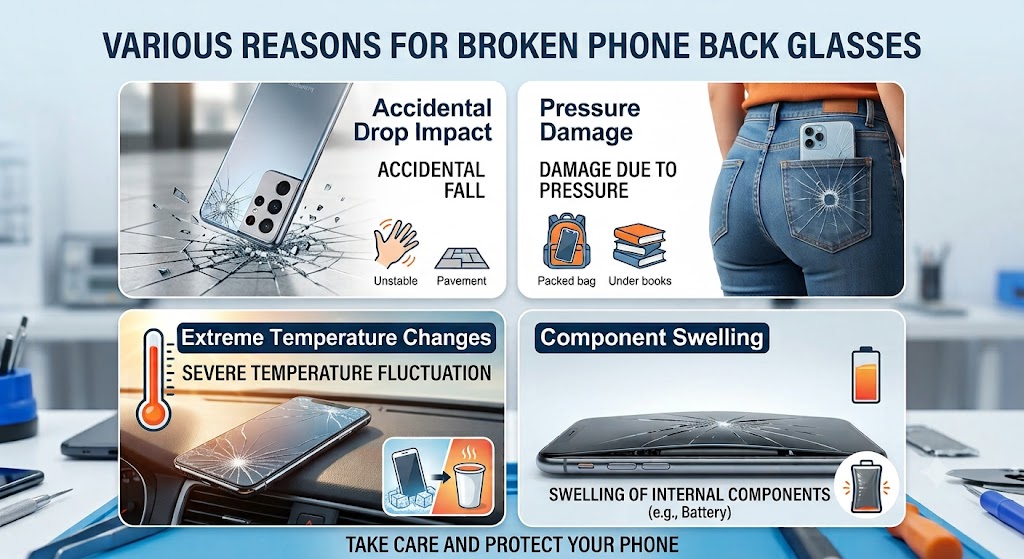
Understanding what caused the damage can help prevent the same problem from happening again. Although accidental drops remain the most common cause, technicians regularly see cracked back glass resulting from several different situations.
In the next section, we’ll explain the most common reasons phone back glass breaks and which types of damage are most likely to require professional repair.
1. Accidental Drops
Dropping a phone onto a hard surface remains the most common cause of cracked back glass.
The severity of the damage depends on several factors, including the height of the fall, the angle of impact, the type of surface, and whether the phone was protected by a quality case.
Even a short drop onto concrete, tiles, or asphalt can create hairline fractures or completely shatter the rear panel.
2. Heavy Impact or Pressure
Not every cracked back glass is caused by dropping the phone.
Sitting on a phone that’s in your back pocket, placing heavy objects on top of it, or trapping it between furniture can place enough pressure on the rear panel to crack the glass.
This type of damage often develops gradually before becoming clearly visible.
3. Repeated Minor Knocks
Small knocks that seem harmless can weaken the glass over time.
Regularly placing your phone on hard surfaces, bumping it against tables, or carrying it alongside keys and other hard objects may create tiny stress fractures that eventually spread.
4. Previous Damage That Was Never Repaired
A phone with an existing hairline crack becomes much more vulnerable to further damage.
Once the structural integrity of the rear glass has been weakened, even a relatively minor impact can cause the crack to spread across the entire back of the device.
Delaying repairs often increases both the extent of the damage and the eventual repair cost.
5. Poor-Quality Protective Accessories
A low-quality phone case may provide little protection during an impact. Cases that don’t properly cover the phone’s corners or raised edges are less effective at absorbing shock, leaving the back glass more exposed if the device is dropped.
Using a well-designed protective case together with a tempered glass camera protector can significantly reduce the risk of damage.
6. Manufacturing Defects (Less Common)
Although uncommon, some devices develop cracks without a major impact. This can happen due to manufacturing defects, weakened glass from previous repairs, or internal pressure caused by a swollen battery.
If your phone develops a crack unexpectedly, especially without being dropped, it’s worth having the device professionally inspected to rule out an underlying hardware issue.
7. Common Causes at a Glance
| Cause | Likelihood | Can It Usually Be Prevented? |
|---|---|---|
| Accidental drop | Very High | Yes, with a quality protective case |
| Heavy pressure | High | Yes |
| Repeated knocks | Medium | Yes |
| Existing unrepaired crack | High | Yes |
| Poor-quality phone case | Medium | Yes |
| Manufacturing defect | Low | Not always |
Not every cracked back glass results in internal damage. However, if the impact was severe enough to crack the rear panel, it’s important to check whether the rest of the phone is still functioning correctly.
How to Check Whether Only the Back Glass Is Broken
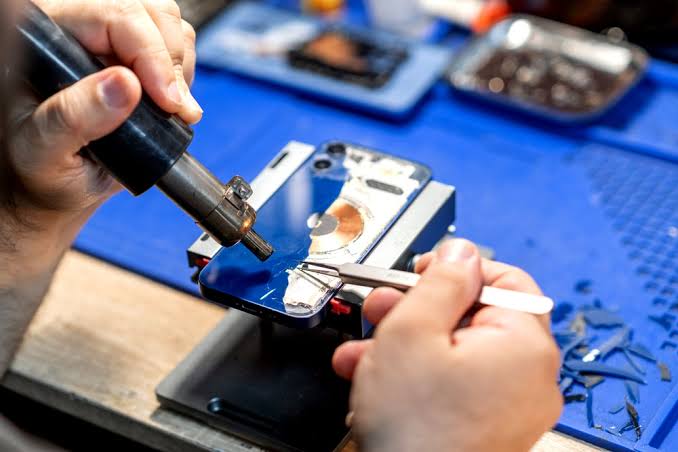
Before arranging a repair, it’s worth checking whether the damage is limited to the rear glass or if the impact has affected other parts of the phone.
In many cases, a cracked back glass is only cosmetic. However, a heavy drop can also damage internal components such as the battery, charging port, cameras, speakers, or wireless charging coil. Identifying these issues early can prevent more expensive repairs later.
1. Inspect the Rear Glass Carefully
Start by examining the back of the phone under good lighting. Look for:
- Hairline cracks
- Spiderweb-style fractures
- Missing pieces of glass
- Loose or lifting sections
- Sharp edges
If the glass is lifting away from the frame or pieces are missing, avoid pressing on the damaged area, as this could allow dust or moisture to enter the phone.
2. Check the Phone Frame
The metal or aluminium frame absorbs much of the force during a drop. Inspect the edges for:
- Dents
- Bends
- Deep scratches
- Gaps between the frame and rear glass
A bent frame can prevent a replacement back glass from fitting correctly and may require additional repair work.
3. Test the Display and Touchscreen
Even if the screen isn’t cracked, the impact may still have affected the display.
Check whether:
- The touchscreen responds across the entire screen.
- Brightness is normal.
- Colours appear correct.
- There are no black spots or flickering.
- No coloured lines have appeared.
If you notice any display or touch issues, it’s possible the impact damaged more than just the rear glass. Our Phone Touch Screen Not Responding guide explains common causes and troubleshooting steps.
4. Test Charging and Wireless Charging
Connect the phone to its charger and confirm that charging starts normally.
If your phone supports wireless charging, test that as well.
Look out for:
- Slow charging
- Charging that repeatedly disconnects
- Wireless charging no longer working
- Phone becoming unusually warm while charging
These symptoms could indicate damage to the charging coil, charging port, or internal connectors. If you’re experiencing charging problems after the drop, our Why Is My Phone Not Charging? guide can help you understand the possible causes.
5. Check the Cameras
Open both the front and rear cameras. Make sure:
- Images are clear.
- Autofocus works properly.
- Camera lenses aren’t cracked.
- There are no dark spots or blurry areas.
If the camera shakes excessively or refuses to focus, the impact may have damaged the camera module.
6. Test Speakers and Microphones
Play music or make a phone call to check that:
- The loudspeaker sounds clear.
- The earpiece works normally.
- The microphone picks up your voice.
- There are no crackling or distorted sounds.
Drops can sometimes loosen internal speaker connections even when the rear glass is the only visible damage. If necessary, you can also refer to our How to Fix Phone Speaker Issues guide.
7. Watch for Battery Problems
A damaged battery isn’t always visible immediately after a drop. Monitor your phone over the next few days for signs such as:
- Rapid battery drain
- Unexpected shutdowns
- Overheating
- Battery swelling
- Phone restarting randomly
If you notice any of these symptoms, stop using the device and have it inspected as soon as possible. A damaged lithium-ion battery can become a safety risk if left unchecked.
8. Quick Inspection Checklist
| Check | What You’re Looking For |
|---|---|
| Rear glass | Cracks, loose pieces, missing glass |
| Phone frame | Bends, dents or gaps |
| Display | Touch response, flickering, lines |
| Charging | Wired and wireless charging working correctly |
| Cameras | Clear images and proper focus |
| Speakers & microphone | Clear sound during calls and media |
| Battery | No overheating, swelling or rapid drain |
After completing these checks, you’ll have a much better idea whether only the back glass needs replacing or if the phone requires more extensive repairs.
DIY vs Professional Back Glass Repair
Once you’ve confirmed that the damage is limited to the rear panel, the next decision is whether to repair the phone yourself or use a professional repair service.
While DIY repair kits are widely available online, replacing a cracked phone back glass is far more complicated than many people expect. Modern smartphones use strong industrial adhesives, delicate internal components, and, in many cases, laser-separated rear glass that requires specialist equipment to remove safely.
For most users, professional repair is the safer and more reliable option.
1. When DIY Repair May Be Possible
DIY replacement may be suitable if:
- You have previous smartphone repair experience.
- You own the correct repair tools.
- The phone model is designed for easier rear panel replacement.
- You’re prepared to accept the risk of accidental damage.
- You’re not concerned about preserving the device’s water resistance.
Even in these situations, care is essential. Removing the rear glass incorrectly can damage internal components and increase the overall repair cost.
2. Challenges of DIY Back Glass Repair
Many people assume replacing the back glass is simply a matter of removing the broken panel and attaching a new one. In reality, modern smartphones often require:
- Controlled heating to soften industrial adhesive.
- Precision tools to separate the glass safely.
- Careful removal of broken glass fragments.
- Cleaning old adhesive before fitting the replacement.
- Accurate alignment of the new rear panel.
- Replacing waterproof adhesive seals where applicable.
Without specialist equipment, it’s easy to damage nearby components such as the battery, wireless charging coil, camera module, or NFC antenna.
3. Benefits of Professional Repair
Professional repair centres use specialised equipment and follow manufacturer-recommended repair procedures where applicable.
A qualified technician can:
- Remove the damaged glass safely.
- Inspect the phone for hidden impact damage.
- Replace damaged adhesive correctly.
- Test charging, cameras, speakers and other functions.
- Ensure the replacement glass fits securely.
Professional repair also reduces the risk of accidental damage during the repair process.
4. DIY vs Professional Repair Comparison
| Factor | DIY Repair | Professional Repair |
|---|---|---|
| Upfront cost | Usually lower | Higher initial cost |
| Risk of damaging the phone | High | Low |
| Specialist tools required | Yes | Included |
| Repair quality | Depends on experience | Consistently high |
| Water-resistant sealing | Difficult to restore | More likely to be restored |
| Time required | Several hours for beginners | Usually much faster |
| Suitable for most users | No | Yes |
5. Is DIY Repair Worth the Risk?
For older or low-value smartphones, some users choose DIY repair because the financial risk is relatively small.
However, for newer devices – especially premium iPhones back glass, Samsung Galaxy models, Google Pixel phones, and other flagship smartphones – the cost of accidentally damaging the battery, cameras, or internal flex cables can quickly exceed the price of a professional repair.
In many cases, paying for expert repair is the more cost-effective option in the long run.
6. Should You Repair the Back Glass or Replace the Entire Phone?
If the rear glass is the only damaged component, replacing it is usually far more affordable than replacing the entire device.
However, if the phone has suffered extensive impact damage affecting multiple components, it may be worth comparing the repair cost with the value of the device.
Our guide on Should You Repair or Replace Your Phone? explains how to decide which option offers the best value based on your phone’s condition, age, and repair costs.
How Professionals Replace Phone Back Glass
Replacing a cracked phone back glass involves much more than simply removing the broken panel and sticking on a new one. Modern smartphones are built with tightly fitted components, strong industrial adhesives, and delicate internal hardware that require careful handling.
Professional technicians follow a structured repair process to minimise the risk of further damage and ensure the replacement back glass fits securely. Although the exact procedure varies between manufacturers and models, the overall process is similar for most modern smartphones.
1. Initial Device Inspection
Before starting the repair, the technician performs a full inspection of the device. This usually includes checking:
- The severity of the back glass damage
- The condition of the phone’s frame
- The display and touchscreen
- Cameras and camera lenses
- Charging functions
- Wireless charging (where supported)
- Battery condition
- Speakers and microphones
This inspection helps identify any hidden damage caused by the original impact.
2. Safely Removing the Broken Back Glass
The damaged rear glass is then removed using specialist tools.
Depending on the phone model, technicians may use controlled heat or laser equipment to soften the adhesive holding the glass in place. The broken glass is carefully lifted away without damaging nearby components.
Removing shattered glass requires patience, as small fragments can remain firmly attached to the adhesive.
3. Cleaning the Device
Once the broken glass has been removed, the frame is thoroughly cleaned. Technicians remove:
- Old adhesive
- Small glass fragments
- Dust and debris
- Residue left behind after the original panel is removed
A clean surface is essential for the new back glass to bond correctly.
4. Fitting the Replacement Back Glass
After cleaning, a high-quality replacement back glass is installed using the correct adhesive for the specific phone model. The replacement panel must be positioned accurately to ensure:
- A secure fit
- Proper alignment with the frame
- Correct positioning around the cameras
- Reliable wireless charging performance (where supported)
Incorrect alignment can affect both the appearance and functionality of the phone.
5. Testing the Phone After Repair
Before returning the phone, professional repair centres typically test key functions to confirm everything is working correctly.
These checks often include:
| Component Tested | Purpose |
|---|---|
| Display and touchscreen | Confirm normal operation |
| Battery and charging | Verify stable charging performance |
| Wireless charging | Ensure charging coil functions correctly |
| Cameras | Check image quality and autofocus |
| Speakers and microphones | Test sound quality during calls and media |
| Buttons | Confirm proper operation |
| Face ID or fingerprint sensor (where applicable) | Verify security features still work |
These final checks help ensure the repair hasn’t affected any other part of the device.
6. How Long Does Back Glass Replacement Take?
Repair times vary depending on the phone model and the extent of the damage. As a general guide:
| Repair Type | Typical Time |
|---|---|
| Minor back glass replacement | 1–2 hours |
| Premium smartphones requiring specialist equipment | 2–4 hours |
| Devices with additional internal damage | Longer, depending on repairs needed |
Some repair centres offer same-day service for popular smartphone models, while others may require additional time if replacement parts need to be ordered.
7. Will the Phone Be Water-Resistant Again?
Professional technicians replace the adhesive seals during the repair whenever possible. However, it’s important to understand that repairing a phone doesn’t always restore the exact factory water-resistance rating.
For this reason, it’s still advisable to avoid exposing the repaired device to water, particularly if it was originally damaged by a heavy impact. With the repair process complete, the next question most people ask is how much it will cost.
How Much Does Back Glass Repair Cost in the UK?
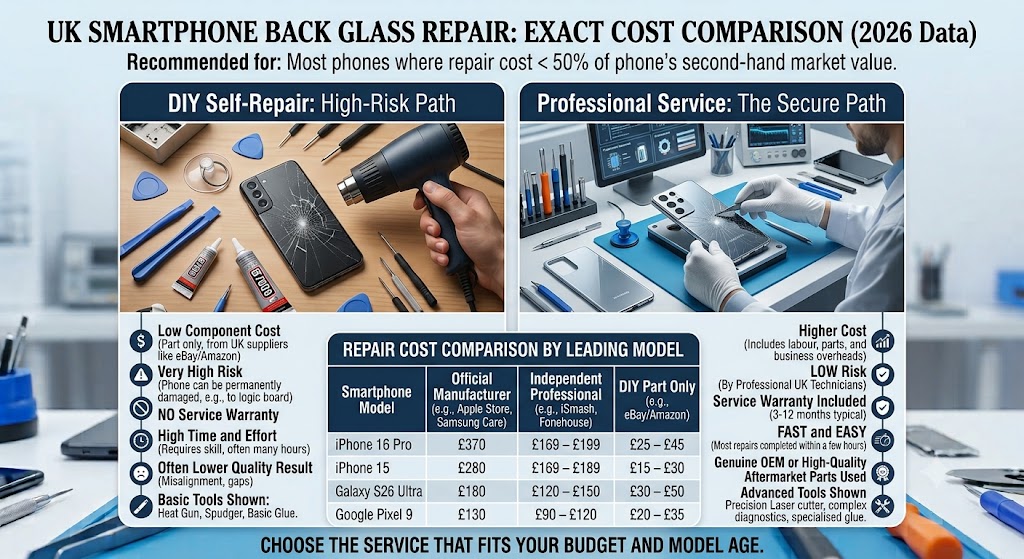
The cost of repairing a cracked phone back glass in the UK can vary considerably. There isn’t a fixed price because every repair depends on the phone model, the type of damage, the replacement parts required, and the repair method used.
Generally, replacing only the back glass is significantly cheaper than replacing the entire phone, especially if the internal components remain undamaged.
If the drop has also affected the display, battery, camera, or charging system, the total repair cost will naturally be higher.
1. What Affects the Cost of Back Glass Repair?
Several factors influence how much you’ll pay for a repair. These include:
- Phone manufacturer and model
- Availability of replacement parts
- Whether only the rear glass is damaged
- Frame damage following the impact
- Wireless charging compatibility
- Labour involved in removing the damaged glass
- Whether genuine or premium-quality replacement parts are used
Flagship smartphones usually cost more to repair because they require more complex repair procedures and higher-value replacement parts.
2. Typical UK Back Glass Repair Costs
The figures below are approximate ranges and may vary between repair providers.
| Device Type | Typical UK Repair Cost |
|---|---|
| Older smartphones | £40-£80 |
| Mid-range smartphones | £60-£120 |
| Premium smartphones | £100-£220+ |
| Foldable smartphones | £200-£500+ |
Actual prices depend on the make, model, and overall condition of the device.
3. Is It Worth Repairing a Cracked Back Glass?
In many cases, yes. Repairing the rear glass is usually worthwhile when:
- The phone is otherwise working normally.
- The display isn’t damaged.
- The battery is in good condition.
- The repair cost is much lower than replacing the phone.
- You want to maintain the phone’s resale or trade-in value.
Replacing the damaged back glass early can also help prevent additional repairs caused by dust, moisture, or further impacts.
4. When Repairs May Cost More
A cracked rear panel doesn’t always tell the whole story. If the phone experienced a heavy impact, technicians may also discover damage to:
- The battery
- Camera module
- Charging port
- Wireless charging coil
- Internal flex cables
- Phone frame
In these situations, repairing multiple components will increase the overall cost.
If your phone also has charging problems after the drop, it’s worth reading our Why Is My Phone Not Charging? guide before deciding on repairs.
5. Repair or Replace?
Sometimes replacing the back glass is clearly the best option. In other cases, especially if the phone has multiple faults or is several years old, replacing the device may offer better long-term value.
The table below provides a general guide.
| Situation | Usually the Better Choice |
|---|---|
| Only the back glass is cracked | Repair |
| Back glass and screen both damaged | Compare repair costs with phone value |
| Multiple internal components damaged | Depends on total repair cost |
| Older phone with expensive repairs | Consider replacement |
| Newer flagship phone in good condition | Repair is usually worthwhile |
If you’re unsure which option makes the most financial sense, our Should You Repair or Replace Your Phone? guide explains how to compare repair costs against the value and expected lifespan of your device.
Now that we’ve covered repair costs, the next step is deciding whether repairing your phone is actually the right choice for your situation.
How to Prevent Your Phone Back Glass from Cracking Again
Once you’ve repaired your phone, taking a few simple precautions can greatly reduce the chances of damaging the back glass again. While no smartphone is completely drop-proof, the right accessories and everyday habits can make a significant difference.
Prevention is almost always cheaper than paying for another repair.
1. Use a High-Quality Protective Case
A well-designed protective case is one of the best ways to reduce the risk of back glass damage. Look for a case that offers:
- Raised edges around the screen and cameras
- Shock-absorbing corners
- A secure fit around the entire phone
- Durable materials that can withstand everyday impacts
Cheap or poorly fitted cases may offer limited protection during a fall.
2. Avoid Placing Your Phone on Hard Surfaces
Putting your phone directly onto concrete, tiles, stone worktops, or other hard surfaces increases the risk of scratches and accidental damage.
Whenever possible, place it on a softer surface or keep it inside a protective case.
3. Keep Your Phone Away from Back Pockets
Many cracked back glass repairs result from phones being carried in back pockets. Sitting down with a phone in your pocket places pressure on the rear panel, particularly on larger smartphones with glass backs.
Using a front pocket, jacket pocket, or bag is usually a safer option.
4. Don’t Ignore Small Cracks
A tiny crack may seem harmless, but it rarely stays that way. Daily use, temperature changes, and minor knocks can quickly cause small fractures to spread across the rear panel.
Repairing minor damage early is often less expensive than waiting until the glass is completely shattered.
5. Handle Your Phone Carefully Around Water
If your phone already has a cracked back glass, avoid exposing it to water until it’s been repaired. Even if the device was originally water-resistant, a damaged rear panel can weaken the protective seals, allowing moisture to reach internal components.
If your phone has already been exposed to liquid after the glass cracked, our “Water Damaged Phone Repair” guide explains the immediate steps you should take.
6. Consider a Camera Lens Protector
Many modern smartphones have raised camera modules that are vulnerable during drops.
A good-quality camera lens protector can help reduce the risk of scratching or cracking the camera glass if the phone lands on its back.
7. Prevention Tips at a Glance
| Tip | Why It Helps |
|---|---|
| Use a shock-absorbing protective case | Reduces impact damage during accidental drops. |
| Avoid carrying the phone in your back pocket | Helps prevent pressure cracks. |
| Repair small cracks promptly | Stops damage from spreading further. |
| Keep the phone away from water after the glass cracks | Reduces the risk of internal moisture damage. |
| Place the phone carefully on hard surfaces | Minimises everyday wear and accidental impacts. |
| Protect the camera lenses | Helps prevent costly camera repairs after a fall. |
Although accidents can’t always be avoided, following these simple habits can significantly reduce the likelihood of another cracked back glass and help keep your phone in good condition for longer.
FAQs About Cracked Phone Back Glass Repair
1. Can a cracked phone back glass be repaired?
Yes. In most cases, a cracked phone back glass can be repaired by replacing the damaged rear glass panel. Professional repair restores the phone’s appearance and helps protect internal components from further damage.
2. Is it safe to use a phone with a cracked back glass?
If the crack is small and the phone is functioning normally, it is usually safe to continue using it temporarily. However, if the glass is shattered, loose, or exposing internal parts, you should arrange a repair as soon as possible to reduce the risk of additional damage.
3. Will a cracked back glass affect my phone’s performance?
Not always. A cracked rear glass often causes only cosmetic damage. However, if the impact also affected internal components, you may experience issues with wireless charging, cameras, speakers, or other hardware.
4. Can I replace my phone’s back glass myself?
DIY replacement is possible on some older smartphones, but modern devices often use strong adhesives, waterproof seals, and delicate internal components. Without the correct tools and experience, there is a higher risk of causing further damage.
5. How much does phone back glass repair cost in the UK?
Repair costs vary depending on the phone model, the availability of replacement parts, and the repair method. Premium smartphones generally cost more to repair than budget or mid-range devices.
6. How long does a back glass repair take?
Many professional repair centres can replace a phone’s back glass within a few hours, although some models may require additional time if specialist equipment or replacement parts are needed.
7. Will repairing the back glass erase my data?
No. Replacing the rear glass normally does not affect your photos, apps, contacts, or other personal data. Even so, creating a backup before any repair is always recommended.
8. Does replacing the back glass restore water resistance?
Professional technicians replace the damaged glass using new adhesive seals, but the original factory level of water resistance cannot always be guaranteed after any smartphone repair.
9. Can a cracked back glass cause battery problems?
The crack itself does not usually damage the battery. However, if the phone experienced a heavy impact, internal components – including the battery – should be inspected to rule out hidden damage.
10. Does a cracked back glass affect wireless charging?
It can. Minor cracks may not interfere with wireless charging, but severe damage or movement of the charging coil after a drop can reduce charging performance or stop it working altogether.
11. Will a phone case stop the crack from spreading?
A quality protective case can help reduce further stress on the damaged glass and lower the risk of additional cracking. However, it does not repair the existing damage.
12. Should I repair the back glass or replace my phone?
If only the rear glass is damaged and the rest of the phone works correctly, repairing it is usually the more cost-effective option. Replacing the entire phone is generally worth considering only if there is extensive internal damage or the repair cost is close to the device’s value.
13. Can dust and moisture enter through a cracked back glass?
Yes. Even small cracks can weaken the phone’s protective seals, making it easier for dust, moisture, and debris to enter the device over time.
14. Which smartphones most commonly have glass backs?
Many modern smartphones feature glass rear panels, including premium models from Apple, Samsung, Google, Huawei, Xiaomi, OnePlus, Motorola, Oppo, and other leading manufacturers.
15. Does a cracked back glass reduce my phone’s resale value?
Yes. Visible damage usually lowers resale or trade-in value because buyers often expect additional repair costs. Repairing the back glass before selling the phone may help you achieve a better price.
16. Can a cracked back glass get worse over time?
Yes. Hairline cracks often spread with everyday use, especially if the phone is carried in a pocket, dropped again, or placed on hard surfaces without adequate protection.
17. Should I repair the back glass immediately after it cracks?
If the damage is severe, the glass is loose, or internal components are visible, immediate repair is strongly recommended. Minor cracks can sometimes wait a short time, but delaying repairs increases the risk of further damage.
18. Can professional repair make my phone look like new again?
In most cases, yes. A professionally installed replacement back glass restores the phone’s appearance, improves protection, and helps maintain its overall value, provided no other components were damaged during the original impact.
Conclusion
A cracked phone back glass may seem like a minor cosmetic issue, but ignoring it can lead to bigger problems over time. Even a small crack can spread with everyday use, weaken the phone’s protection against dust and moisture, and increase the risk of damage to internal components.
In many cases, replacing the damaged rear glass is far more affordable than replacing the entire smartphone. If the display, battery, cameras, and other essential components are still working correctly, professional back glass replacement can restore both the appearance and structural protection of your device while extending its lifespan.
Although temporary solutions such as protective cases or tape may help prevent the crack from worsening, they are not permanent repairs. Modern smartphones are built with precision-fitted glass panels, industrial adhesives, wireless charging systems, and water-resistant seals, making professional repair the safest and most reliable option for most devices.
The sooner a cracked back glass is assessed, the lower the chance of the damage leading to more expensive repairs in the future. Understanding the condition of your device and choosing the right repair solution can help you protect your investment and keep your smartphone performing reliably.
Why Choose iExpert Repairs for Back Glass Repair?
At iExpert Repairs, we specialise in professional smartphone repairs for a wide range of leading brands, including Apple, Samsung, Google, Huawei, Xiaomi, OnePlus, Motorola, Oppo, and many others.
Our certified technicians carefully inspect every device to identify both visible and hidden damage before recommending the most appropriate repair. Whether your phone has a cracked back glass, screen damage, charging issues, battery problems, or other hardware faults, every repair is carried out using professional equipment and quality replacement parts where required.
We believe in transparent advice, reliable workmanship, and helping customers make informed decisions based on the actual condition of their devices rather than recommending unnecessary repairs.
Back to posts