Quick Answer: How Do You Stop a Phone From Overheating?
If your phone is overheating, immediately stop using demanding apps, move the device to a cooler environment, remove its protective case, lower the screen brightness, disconnect it from the charger if safe to do so, and allow it to cool naturally. Restart the phone after it has cooled, install any available software updates, and check battery usage to identify apps consuming excessive resources.
If your phone becomes hot repeatedly during normal use, shuts down because of temperature warnings, drains its battery unusually quickly, or continues overheating after basic troubleshooting, the issue may be caused by a failing battery, charging component, motherboard fault, or previous liquid damage. In these situations, a professional diagnostic is recommended before further damage occurs.
Introduction
Modern smartphones are more powerful than ever before. They stream high-definition videos, run advanced mobile games, capture professional-quality photos, process artificial intelligence features, support fast charging, and perform dozens of background tasks simultaneously. While these capabilities make smartphones incredibly useful, they also generate heat.
A slightly warm phone during charging or heavy use is completely normal. However, when your device becomes uncomfortably hot, displays temperature warnings, drains its battery rapidly, slows down unexpectedly, or shuts itself off to protect internal components, overheating should never be ignored. Excessive heat can reduce battery lifespan, slow overall performance, damage delicate internal hardware, and in severe cases, permanently affect important components such as the battery, charging circuitry, display, processor, and motherboard. The longer an overheating problem continues, the greater the risk of expensive repairs.
Fortunately, many overheating problems are not caused by permanent hardware failure. Our technicians regularly diagnose devices that appear to have serious thermal issues but are actually affected by software bugs, background applications, incorrect charging habits, poor ventilation, or environmental conditions. Identifying the real cause is the key to preventing unnecessary repair costs. Whether you own an iPhone, Samsung Galaxy, Google Pixel, Huawei, OnePlus, Oppo, Vivo, Xiaomi, Motorola, Sony Xperia, or another Android smartphone, the troubleshooting advice in this guide applies to almost every modern mobile device.
Why Do Phones Overheat?
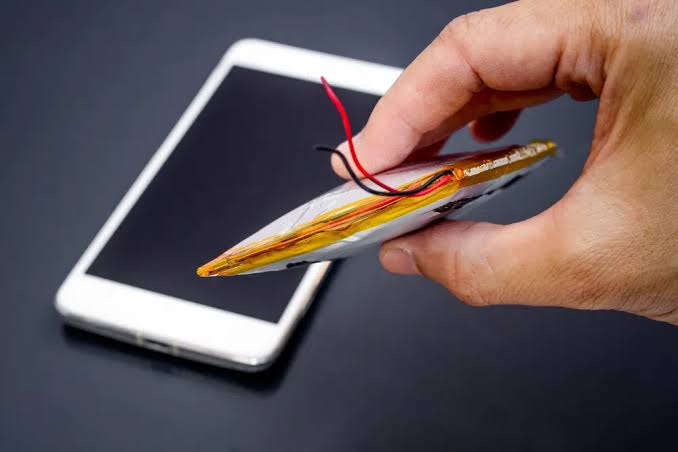
Every smartphone generates heat while operating. The processor, graphics chip, battery, display, modem, cameras, and charging system all produce heat whenever they are working. Under normal conditions, this heat is safely dispersed through the phone’s internal cooling design.
Unlike laptops or desktop computers, smartphones do not contain cooling fans. Instead, they rely on graphite sheets, copper heat spreaders, vapour chambers, aluminium frames, and software-based thermal management to regulate temperature. When these systems become overwhelmed, the device begins to overheat.
Some heating is completely expected during:
- Fast charging
- 4K or 8K video recording
- Long gaming sessions
- Video editing
- GPS navigation
- Video calls
- Large software updates
- File transfers
- Mobile hotspot usage
However, if your phone becomes excessively hot while performing simple tasks such as browsing the internet, sending messages, checking emails, or remaining idle on a table, this often indicates an underlying issue that requires further investigation.
Our repair technicians frequently discover that persistent overheating is linked to deteriorating batteries, damaged charging circuits, software conflicts, liquid damage, or failing internal components rather than normal daily usage. Understanding the difference between expected warmth and abnormal overheating is the first step towards preventing more serious hardware damage.
Common Causes of Smartphone Overheating
Although every device is different, most overheating problems fall into several common categories.
1. Heavy Processor Workloads
Modern applications place enormous demands on smartphone processors. High-performance games, video editing software, augmented reality applications, artificial intelligence features, and continuous camera processing can push both the CPU and GPU close to their maximum capacity.
As processor activity increases, power consumption rises, generating additional heat.
2. Battery Wear
Lithium-ion batteries naturally degrade over time. As batteries age, they become less efficient and generate more heat during charging and normal operation.
Older batteries may also experience increased internal resistance, making overheating more noticeable even during everyday tasks.
3. Charging Problems
Using damaged charging cables, incompatible power adapters, faulty wireless chargers, or defective charging ports can produce excessive heat while charging. If your phone becomes unusually hot whenever it charges, the charging system itself may require professional inspection.
4. Software Conflicts
Operating system bugs, corrupted updates, poorly optimised applications, or apps running continuously in the background can place constant stress on the processor. In many cases, software optimisation alone significantly reduces operating temperatures.
5. Environmental Heat
Using your smartphone outdoors on hot summer days, leaving it inside a parked vehicle, or exposing it to direct sunlight can raise internal temperatures rapidly. Once the surrounding temperature increases, your phone has far less ability to cool itself effectively.
6. Internal Hardware Faults
Persistent overheating may also indicate:
- Failing batteries
- Charging IC problems
- Motherboard faults
- Power management IC failure
- Liquid damage corrosion
- Short circuits
- Damaged charging assemblies
These faults generally require specialist diagnostic equipment and should not be ignored.
Why Is My Phone Overheating? (Understanding the Root Causes)
Before you can stop your phone from overheating, you first need to understand why it becomes hot in the first place. Smartphones naturally produce heat whenever the processor, battery, display, modem, or charging circuitry is working. However, when the temperature rises beyond normal operating levels, performance begins to suffer, battery life decreases, and internal components may become permanently damaged.
Modern smartphones – including iPhones, Samsung Galaxy devices, Google Pixel phones, Huawei smartphones, OnePlus devices, Oppo, Xiaomi, Sony Xperia, Motorola, and other Android phones – contain advanced processors capable of handling gaming, AI photography, 4K video recording, navigation, and multitasking. All of these activities generate heat. Occasional warmth is completely normal. Excessive overheating is not.
Overheating can occur because of software problems, faulty charging accessories, battery degradation, damaged internal components, environmental conditions, or poor device maintenance. Professional diagnosis always starts by identifying the actual source of the heat rather than assuming the battery is responsible.
Common Reasons Phones Overheat
Some of the most common causes include:
- Heavy gaming
- Recording 4K or 8K videos
- Fast charging
- Wireless charging
- Background apps
- Poor signal strength
- GPS navigation
- Direct sunlight
- Old battery
- Software bugs
- Malware
- Water damage
- Charging port faults
- Motherboard issues
Some problems are completely harmless, while others indicate hardware damage requiring professional repair.
Is Your Phone Too Hot or Just Warm?
Many users become worried even though their phone is operating within its normal temperature range. Generally:
Normal Temperature
- Slight warmth while charging
- Warm during gaming
- Warm during video calls
- Slight heat while updating apps
Abnormal Temperature
- Too hot to hold comfortably
- Temperature warning appears
- Apps begin closing automatically
- Screen dims unexpectedly
- Charging pauses itself
- Phone restarts repeatedly
- Camera stops working
- Battery drains rapidly
If these symptoms appear regularly, further troubleshooting is recommended.
What Happens When a Phone Overheats?
Modern smartphones include built-in thermal protection systems designed to prevent permanent damage. When internal temperatures rise too high, your phone may automatically:
- Reduce processor speed
- Lower screen brightness
- Disable camera flash
- Pause charging
- Close background apps
- Disable 5G temporarily
- Display temperature warnings
- Restart automatically
- Shut down completely
These safety measures help protect the battery, processor, display, storage chips, and motherboard. Ignoring repeated overheating may eventually shorten your phone’s lifespan.
How to Stop Your Phone from Overheating (Step-by-Step Guide)
Step 1: Remove the Phone Case
Many protective cases trap heat. Thick rugged cases, waterproof cases and low-quality silicone covers reduce airflow around the device. While they provide excellent protection against drops, they can also prevent heat from escaping. If your phone feels unusually hot:
- Remove the case.
- Leave the phone on a flat surface.
- Allow it to cool naturally.
- Avoid placing it on cushions or beds.
Many overheating complaints disappear after removing heavy protective cases during gaming or charging.
Step 2: Stop Using the Phone Immediately
If your phone becomes extremely hot, continuing to use it will only increase internal temperatures.
Close:
- Games
- Camera
- Social media
- Video streaming
- Navigation
- Video calls
Turn off the display and allow the device several minutes to cool naturally. Never place a hot phone inside a refrigerator or freezer. Rapid temperature changes can create internal condensation, leading to moisture damage.
Step 3: Close Background Applications
Many apps continue working even when you’re no longer using them. These may include:
- Social media
- Cloud backups
- Photo syncing
- GPS tracking
- Fitness apps
- Streaming services
- Messaging apps
Closing unnecessary background applications reduces processor activity and lowers heat generation. Restarting the phone also clears many temporary background processes.
Step 4: Reduce Screen Brightness
The display is one of the largest power consumers inside any smartphone. Maximum brightness significantly increases battery usage and processor workload. Reduce brightness manually or enable:
- Auto Brightness
- Adaptive Brightness
- Dark Mode
These settings reduce heat while extending battery life. OLED displays especially benefit from Dark Mode during prolonged use.
Step 5: Turn Off Unused Features
Many wireless radios continue working constantly. Disable features you don’t currently need:
- Bluetooth
- GPS
- NFC
- Personal Hotspot
- Wi-Fi (when unused)
- Mobile Data (when unnecessary)
Reducing wireless activity helps lower processor load and battery consumption.
Step 6: Move Out of Direct Sunlight
Environmental heat dramatically affects smartphone temperature. Avoid leaving your phone:
- Inside parked cars
- On dashboards
- On window ledges
- At the beach
- Near heaters
- In direct sunlight
Even a perfectly healthy smartphone can overheat when exposed to high external temperatures. If possible:
- Move indoors.
- Place the phone in the shade.
- Allow natural airflow.
Step 7: Turn Off Fast Charging When Possible
Fast charging is one of the biggest reasons modern smartphones become warm. Technologies such as USB Power Delivery (USB-PD), Qualcomm Quick Charge, Samsung Super Fast Charging, Huawei SuperCharge, and other fast-charging systems deliver higher power to the battery, naturally generating more heat.
A slight increase in temperature while fast charging is normal. However, if your phone becomes excessively hot every time it charges, there may be an underlying issue that needs attention. If you do not need a rapid charge, consider using standard charging for overnight charging sessions. You can also:
- Remove the phone case while charging.
- Charge on a hard surface.
- Avoid charging under pillows or blankets.
- Keep the charging area well ventilated.
- Stop using demanding apps while charging.
Reducing charging stress helps improve battery longevity and keeps temperatures under control.
Step 8: Use Genuine or High-Quality Chargers
Low-quality charging accessories are a common cause of overheating. Cheap chargers may deliver unstable voltage or current, placing unnecessary stress on your phone’s battery and charging circuitry.
Always use:
- Original manufacturer chargers
- Certified USB cables
- Trusted power adapters
- High-quality charging accessories
Avoid:
- Damaged charging cables
- Loose USB connectors
- Unknown third-party chargers
- Extremely cheap charging accessories
Using reliable charging equipment helps maintain safe charging temperatures while protecting your battery and charging port.
Step 9: Update Your Phone’s Software
Software updates do much more than add new features. Manufacturers frequently release improvements for:
- Thermal management
- Battery optimisation
- CPU efficiency
- Charging performance
- Background app control
- Security patches
- System stability
If your phone started overheating immediately after installing an update, don’t panic. Manufacturers often release follow-up updates that resolve temporary software bugs affecting temperature management. Check for updates regularly.
iPhone
Settings → General → Software Update
Android
Settings → Software Update
Install only official updates provided by your device manufacturer. If your phone becomes unusually hot while charging, charges slowly, or repeatedly displays charging warnings, our Why Is My Phone Not Charging? explains how charging faults, damaged ports, faulty accessories, and battery issues can all contribute to overheating.
Step 10: Scan for Malware and Problematic Apps
Although less common than hardware faults, malicious software can significantly increase processor activity. Signs include:
- Constant overheating
- Rapid battery drain
- Slow performance
- Random advertisements
- High data usage
- Apps opening unexpectedly
Review recently installed applications. Uninstall any apps that:
- Continuously run in the background
- Request unnecessary permissions
- Consume excessive battery
- Cause the phone to become hot immediately after installation
Keeping only trusted applications installed improves both security and thermal performance.
Step 11: Restart Your Phone Regularly
Many users leave their smartphones running for weeks without restarting them. Over time, background services, temporary files, memory leaks, and stalled processes may increase processor workload. Restarting your device helps:
- Refresh system services
- Clear temporary cache
- Close frozen background apps
- Improve RAM management
- Reset network connections
A simple restart often resolves temporary overheating caused by software glitches.
Step 12: Enable Battery Optimisation
Modern smartphones include intelligent battery management systems that reduce unnecessary power consumption. Battery optimisation limits:
- Background activity
- Automatic syncing
- Location tracking
- Idle processor usage
- Battery-intensive apps
Enabling these features reduces heat generation throughout the day while extending battery life.
Can Overheating Damage Your Phone?
Yes. Occasional warmth is perfectly normal, but repeated overheating can gradually damage several important components inside your smartphone.
Long-term exposure to excessive heat may affect:
- Battery health
- OLED display
- Processor
- Charging IC
- Storage chips
- Camera sensors
- Motherboard
- Internal adhesives
- Waterproof seals
Over time, this can lead to reduced performance, shorter battery life, charging issues, unexpected shutdowns, and costly repairs. This is why manufacturers build automatic thermal protection systems into modern smartphones. Ignoring repeated overheating warnings can eventually shorten your device’s overall lifespan.
Warning Signs That Overheating Is Becoming Serious
Contact a professional technician if your phone regularly experiences any of these symptoms:
- Temperature warning messages
- Phone shuts down automatically
- Battery swelling
- Burning smell
- Screen discoloration
- Display flickering
- Charging stops repeatedly
- Camera closes automatically
- Device becomes too hot to hold
- Heat continues even when idle
These symptoms often indicate a hardware issue rather than normal operating temperatures.
From Our Repair Bench
At iExpert Repairs, one of the most common misconceptions we encounter is that every overheating phone needs a new battery. In reality, our diagnostics often reveal other causes such as a failing charging port assembly, software conflicts, damaged power management circuitry, or poor-quality charging accessories. By identifying the exact source of the heat before replacing any components, we help customers avoid unnecessary repair costs while restoring safe and reliable performance.
Can Overheating Damage Your Phone Battery?
Yes. Your smartphone’s battery is one of the components most affected by excessive heat. Modern smartphones use lithium-ion batteries, which are designed to operate within a safe temperature range. When the battery is repeatedly exposed to high temperatures, its chemical structure gradually begins to degrade.
Unlike accidental damage, battery wear caused by overheating happens slowly over time. Many users only notice the problem after months of repeated overheating.
Signs Heat Is Damaging Your Battery
Watch for symptoms such as:
- Battery draining unusually fast
- Unexpected shutdowns
- Slow charging
- Battery percentage jumping suddenly
- Battery health declining quickly
- Phone becoming hot during normal tasks
- Swollen battery
- Reduced screen-on time
- Poor performance
If several of these symptoms appear together, professional battery testing is recommended.
Can Overheating Damage the Processor?
Absolutely. The processor (CPU) is effectively the brain of your smartphone. During demanding activities such as:
- Gaming
- AI image processing
- Video editing
- 4K or 8K recording
- Live streaming
- Augmented reality
the processor generates significant heat. Modern smartphones automatically reduce processor speed through a process known as thermal throttling.
Thermal throttling protects the processor from permanent damage by slowing performance until temperatures return to safe levels. This explains why an overheating phone often feels slower than usual. You may notice:
- Lag
- Apps freezing
- Lower gaming frame rates
- Camera delays
- Slower multitasking
These symptoms often disappear once the device cools.
Can Overheating Damage the Display?
Yes. Excessive temperatures can affect OLED and LCD displays over time. Possible issues include:
- Screen flickering
- Temporary image retention
- Brightness reduction
- Touchscreen lag
- Colour distortion
- Display blackouts
Fortunately, modern smartphones include thermal protection that automatically lowers screen brightness before serious damage occurs. If your display repeatedly flickers during overheating, further inspection may be required.
Can Overheating Damage the Motherboard?
The motherboard is the most important hardware component inside your smartphone. Repeated overheating may gradually affect:
- Power management circuits
- Audio IC
- Charging IC
- Memory chips
- CPU connections
- Solder joints
Although modern devices are built to withstand occasional high temperatures, long-term overheating can shorten the lifespan of delicate electronic components. Motherboard repairs are considerably more complex than replacing batteries or screens. Preventing overheating is therefore much more cost-effective than repairing board-level damage later.
Common Overheating Myths
Many online suggestions for cooling smartphones are either ineffective or potentially harmful. Let’s separate fact from fiction.
| Myth | Reality |
|---|---|
| Put your phone in the freezer | ❌ Rapid cooling can create condensation and cause internal damage. |
| Place your phone in a refrigerator | ❌ Moisture may form inside the device. |
| Use ice packs directly | ❌ Sudden temperature changes may damage internal components. |
| Overheating always means the battery is faulty | ❌ Software, charging accessories, apps, or motherboard issues can also be responsible. |
| Every hot phone needs replacing | ❌ Many overheating issues can be resolved through proper troubleshooting or repair. |
| Closing every app permanently prevents overheating | ❌ Background activity is only one possible cause. |
The safest method is always to allow the phone to cool naturally in a well-ventilated environment.
When Does an Overheating Phone Need Professional Repair?
Although many overheating issues can be resolved at home, certain symptoms usually indicate an internal hardware fault. Arrange a professional diagnostic if your phone:
- Overheats every day
- Gets hot while idle
- Overheats during light use
- Shuts down repeatedly
- Stops charging
- Displays temperature warnings frequently
- Has been exposed to water
- Became hot after being dropped
- Shows battery swelling
- Emits unusual smells
- Experiences multiple hardware issues simultaneously
Professional diagnostics help identify whether the fault lies with the battery, charging port, power management system, motherboard, or another internal component.
How Professional Technicians Diagnose an Overheating Phone
When a smartphone repeatedly overheats, replacing the battery immediately isn’t always the correct solution. At iExpert Repairs, every device undergoes a structured diagnostic process to identify the actual source of the problem before any repair is recommended.
Modern smartphones are made up of hundreds of interconnected components. Heat may originate from the battery, charging port, power management IC, processor, motherboard, software, or even a third-party accessory. Professional diagnostics help isolate the fault, ensuring only the necessary repair is carried out.
Our technicians begin by gathering information from the customer, including when the overheating occurs, how long it lasts, whether it happens while charging or during normal use, and if the device has recently been dropped, exposed to water, or updated. This approach saves customers from paying for unnecessary repairs while improving the chances of a long-lasting solution.
Step 1: Understanding When the Phone Gets Hot
One of the first questions we ask is “When does the phone actually overheat?” The answer often provides valuable clues. For example:
- A phone that overheats only while charging may have a charging system fault.
- A device that becomes hot during gaming may simply be working under heavy load.
- A phone that overheats while sitting idle usually requires deeper investigation.
- If overheating started immediately after liquid exposure, internal corrosion may be affecting the power circuits.
Understanding the pattern helps technicians narrow down the possible causes before opening the device.
What Different Overheating Patterns Can Tell You
| When Does the Phone Overheat? | What It May Indicate | Our Recommended Next Step |
|---|---|---|
| Only while charging | Charging accessory, charging port, or battery issue | Test with an original charger and inspect the charging system. |
| During gaming or video editing | Heavy processor workload | Reduce demanding tasks and monitor temperatures. |
| While using the camera | Normal processing or camera-related hardware issue | Allow the phone to cool and check for software updates. |
| Even when the phone is idle | Background process or hardware fault | Carry out a full software and hardware diagnostic. |
| After water exposure | Possible internal corrosion | Arrange a professional inspection as soon as possible. |
| Immediately after a drop | Loose connector or damaged internal component | Have the device checked before further damage develops. |
Step 2: External Inspection
Before any tools are used, the device is carefully examined from the outside. Technicians look for physical signs that may explain the overheating. These include:
- Cracked back glass
- Bent frame
- Swollen battery
- Loose charging port
- Signs of liquid exposure
- Burn marks around the charging connector
- Previous repair work
- Poorly fitted replacement parts
Sometimes the cause becomes obvious before the phone is even opened.
A swollen battery, for example, should always be replaced immediately because it presents both a performance and safety risk.
If your phone became noticeably hotter after being dropped and now has additional problems such as charging issues, display faults, or camera failures, our How to Fix Phone? guide explains how accidental damage can affect multiple internal components and why a complete diagnostic is often the safest approach.
Step 3: Battery Health Assessment
Battery testing is one of the most important parts of the diagnostic process.As lithium-ion batteries age, they become less efficient at storing and delivering power. This forces the battery to work harder, generating additional heat during everyday tasks.
Rather than relying on guesswork, technicians measure battery performance using professional diagnostic tools. They assess:
- Battery health
- Charge cycles
- Voltage stability
- Charging behaviour
- Temperature readings
- Current draw
- Battery efficiency
These results help determine whether the battery is still operating within safe limits or has reached the point where replacement is the most practical solution.
Signs Your Battery May Be Contributing to Overheating
| What You Notice | What It Could Mean | Recommended Action |
|---|---|---|
| Battery drains much faster than before | Battery cells may be worn | Have the battery professionally tested. |
| Phone becomes hot during basic tasks | Reduced battery efficiency | Check battery health before replacing other parts. |
| Device shuts down unexpectedly | Battery may no longer supply stable power | Arrange a diagnostic to confirm the fault. |
| Battery percentage changes suddenly | Battery calibration or ageing issue | Perform a health assessment before replacing the device. |
| Rear panel lifting slightly | Possible battery swelling | Stop using the phone and seek immediate professional assistance. |
Step 4: Charging System Inspection
Many people assume overheating always starts with the battery. In reality, the charging system is responsible for a significant number of overheating cases we diagnose. Our technicians inspect:
- Charging port
- USB connector
- Charging flex cable
- Charging IC
- Power management circuit
- Charging accessories
Dust inside the charging port, damaged connectors, or unstable voltage can all generate unnecessary heat while charging. Using genuine or premium-quality accessories helps minimise unnecessary stress on the charging system.
Step 5: Software Diagnostics
Not every overheating issue is caused by faulty hardware. Modern smartphones constantly manage hundreds of background processes, applications, wireless connections, and security services.
A software conflict can sometimes keep the processor working continuously without the user realising it. Professional software diagnostics check:
- Background applications
- CPU usage
- Battery consumption
- Memory usage
- System errors
- Firmware version
- Thermal logs
- Operating system integrity
Many devices return to normal after unnecessary background activity has been identified and corrected.
Software Issues That Can Make a Phone Run Hot
| Software Problem | What You Might Experience | How It’s Usually Resolved |
|---|---|---|
| App stuck in the background | Constant warmth and faster battery drain | Force close or uninstall the app if necessary. |
| Failed software update | Random overheating after an update | Install the latest official update or system patch. |
| Corrupted system files | Slow performance and excessive heat | Repair or reset affected system settings. |
| Malware or suspicious apps | High processor activity even when idle | Remove the app and perform a security scan. |
| Too many background services | Device feels warm throughout the day | Optimise background activity and restart the phone regularly. |
How to Stop an iPhone from Overheating
iPhones are designed with intelligent thermal management, but they can still become hot during charging, gaming, video recording, navigation, or software-intensive tasks. Newer models may temporarily reduce screen brightness, slow performance, or pause charging until the temperature returns to normal.
The good news is that most overheating problems can be prevented with a few simple habits.
1. Reduce Display Brightness
The OLED or LCD display is one of the largest power consumers on an iPhone. Instead of keeping brightness at 100%, enable Auto-Brightness or manually lower it when indoors. Doing so reduces battery strain while keeping the device significantly cooler.
2. Avoid Direct Sunlight
Leaving an iPhone on a car dashboard, garden table, or windowsill during summer can quickly push internal temperatures beyond Apple’s recommended operating range. Always keep the device in the shade whenever possible.
3. Update iOS Regularly
Apple frequently improves:
- Battery optimisation
- CPU scheduling
- Background processing
- Thermal management
- Bug fixes
Installing the latest iOS version often resolves unexplained heating problems.
4. Remove Thick Cases During Intensive Tasks
Heavy protective cases can trap heat. If you’re:
- Recording 4K video
- Gaming
- Charging quickly
- Using GPS navigation
consider removing the case temporarily.
5. Use Certified Chargers
Poor-quality chargers often generate unnecessary heat. Using Apple-certified or reputable USB-C chargers provides more stable charging and better temperature control.
Common iPhone Overheating Causes
| Situation | Likely Cause | Recommended Action |
|---|---|---|
| Phone gets hot while charging | Fast charging | Remove case and charge in a cool room |
| Warm during FaceTime | High processor usage | Lower brightness and close unused apps |
| Hot after iOS update | Background indexing | Wait several hours for optimisation |
| Heats during gaming | GPU workload | Reduce graphics settings |
| Gets hot outdoors | High ambient temperature | Move to shade immediately |
How to Prevent Samsung Galaxy Phones from Overheating
Samsung devices include advanced cooling systems, especially in flagship Galaxy models. However, intensive multitasking and gaming can still increase temperatures.
1. Enable Adaptive Battery
Samsung’s Adaptive Battery learns your usage habits and limits unnecessary background activity. Benefits include:
- Lower CPU usage
- Reduced battery drain
- Less heat generation
2. Optimise Device Care
Samsung’s Device Care automatically detects:
- Memory usage
- Background apps
- Battery health
- Storage issues
Running optimisation once every few days helps maintain smooth performance.
3. Reduce Gaming Graphics
Samsung phones with high-refresh-rate AMOLED displays consume considerable power. Lowering:
- Graphics quality
- Frame rate
- Screen refresh rate (when appropriate)
helps reduce thermal load.
4. Samsung Cooling Tips
| Feature | Benefit |
|---|---|
| Adaptive Battery | Reduces unnecessary background activity |
| Device Care | Optimises memory and storage |
| Performance Profile | Balances speed and temperature |
| Software Updates | Improves efficiency |
| Certified Charger | Stable charging temperatures |
If your Samsung also experiences rapid battery drain, our Why Is My Phone Battery Draining So Fast? guide explains how overheating and battery degradation are often connected.
How to Stop Google Pixel Phones from Overheating
Google Pixel devices rely heavily on AI processing. Features such as:
- Magic Editor
- Live Translate
- Call Screening
- Recorder AI
- Circle to Search
place additional demands on the processor.
1. Reduce Background AI Tasks
Close apps you’re no longer using. Background AI processing continues even after switching apps.
2. Install Pixel Feature Updates
Google frequently releases updates that improve:
- Battery optimisation
- Heat management
- Tensor chip performance
Keeping Pixel software updated is essential.
3. Disable Unused Location Services
Continuous GPS tracking creates additional heat. Only allow location access for apps that genuinely need it.
4. Pixel Overheating Checklist
| Check | Status |
|---|---|
| Latest Android version installed | ✓ |
| Background apps closed | ✓ |
| GPS limited | ✓ |
| AI features managed | ✓ |
| Charging with certified charger | ✓ |
Smartphone Brand Comparison
| Brand | Common Heat Trigger | Best Prevention Method |
|---|---|---|
| Apple iPhone | Video recording | Reduce brightness |
| Samsung Galaxy | Gaming | Device Care optimisation |
| Google Pixel | AI processing | Install updates |
| Huawei | Camera usage | Battery optimisation |
| OnePlus | Fast charging | Charge in cool environments |
| Xiaomi | Gaming | Performance mode management |
| Oppo | Background apps | Battery optimisation |
| Vivo | Camera processing | Close unused apps |
Human-Friendly Repair Comparison
| Problem | Can You Fix It Yourself? | Professional Repair Needed? |
|---|---|---|
| Too many apps running | Yes | No |
| High screen brightness | Yes | No |
| Hot weather | Yes | No |
| Software bug | Usually | Rarely |
| Dust in charging port | ⚠ Sometimes | If severe |
| Battery deterioration | No | Yes |
| Charging IC fault | No | Yes |
| Motherboard overheating | No | Yes |
| Water damage | No | Yes |
How to Prevent Your Phone from Overheating in the Future
Once you’ve resolved an overheating issue, adopting a few simple habits can significantly reduce the chances of it happening again. At iExpert Repairs, many of the overheating cases we diagnose could have been avoided with better charging practices, regular software maintenance, and improved device care.
Below are the most effective ways to keep your smartphone running cooler throughout the year.
1. Charge Your Phone in a Cool Environment
Charging naturally generates heat because electrical energy is converted into stored battery power. Charging in a hot room, inside a parked car, or under direct sunlight increases this heat even further.
For safer charging:
- Place your phone on a hard, flat surface.
- Avoid charging on beds, sofas, cushions, or blankets.
- Keep the device away from radiators and windows exposed to direct sunlight.
- If possible, remove thick protective cases while fast charging.
Keeping the surrounding temperature lower allows heat to dissipate more efficiently and helps protect the battery over time.
2. Use Genuine or Certified Charging Accessories
Low-quality chargers and damaged cables can deliver unstable power, causing unnecessary heat and increasing the risk of battery wear. Choose:
- Original manufacturer chargers.
- USB-C PD certified chargers.
- MFi-certified Lightning accessories for iPhones.
- High-quality USB cables from reputable brands.
Using reliable accessories helps maintain stable charging speeds and reduces stress on the phone’s power management system.
Comparison of Charging Accessories
| Charger Type | Heat Generation | Recommended? |
|---|---|---|
| Manufacturer Original | Low | Yes |
| Certified Third-Party | Low | Yes |
| Cheap Unbranded Charger | High | No |
| Damaged Charging Cable | High | Replace Immediately |
| Unknown Fast Charger | Moderate to High | Use with Caution |
3. Keep Your Software Up to Date
Software updates are about more than security. They often include improvements to battery optimisation, processor efficiency, and thermal management.
Regular updates can:
- Reduce unnecessary background activity.
- Improve charging behaviour.
- Fix overheating-related software bugs.
- Enhance battery performance.
- Improve app compatibility.
If your device became warm after a recent update, allow a day or two for background optimisation before assuming there is a hardware fault.
4. Protect Your Phone from Extreme Temperatures
Both excessive heat and freezing conditions can affect battery performance. Avoid leaving your phone:
- On a car dashboard.
- Next to heaters.
- In direct sunlight.
- Near kitchen appliances.
- Inside hot tents during summer.
Likewise, extremely cold conditions can temporarily reduce battery performance until the phone returns to a normal operating temperature.
5. Give Your Phone Time to Rest
Many people use their phones continuously throughout the day for gaming, streaming, navigation, photography, and social media. Allowing the device to cool between demanding tasks helps prevent heat from building up. Simple habits include:
- Closing unused apps.
- Locking the screen when not in use.
- Restarting the phone every few days.
- Taking short breaks during long gaming sessions.
These small changes reduce processor workload and improve overall stability.
Typical UK Phone Overheating Repair Costs
The cost of repairing an overheating phone depends on the underlying cause. A software optimisation may cost little or nothing, while board-level repairs require specialist diagnostics and equipment.
| Repair Type | Typical UK Cost |
|---|---|
| Professional Diagnostic | £15-£35 |
| Internal Cleaning | £20-£40 |
| Battery Replacement | £40-£120 |
| Charging Port Repair | £40-£100 |
| Cooling / Thermal Optimisation | £30-£70 |
| Power Management IC Repair | £90-£220 |
| Motherboard Repair | £120-£300+ |
The exact price depends on the phone model, the extent of the damage, and whether multiple components require repair.
Typical Repair Times
| Repair | Estimated Time |
|---|---|
| Diagnostic Assessment | 20-40 Minutes |
| Software Optimisation | Same Day |
| Battery Replacement | 45-90 Minutes |
| Charging Port Repair | 1-2 Hours |
| Water Damage Diagnostic | Same Day |
| Motherboard Repair | 1-3 Working Days |
Most common overheating-related repairs can be completed on the same day, subject to parts availability.
FAQs About Phone Overheating
1. Is it normal for a phone to get warm while charging?
Yes. A slight increase in temperature during charging is normal. However, if the phone becomes too hot to comfortably hold, further investigation is recommended.
2. Can overheating permanently damage my phone?
Yes. Repeated overheating can shorten battery lifespan, reduce performance, and in severe cases damage internal components.
3. Does fast charging make phones hotter?
Yes. Fast charging naturally generates more heat than standard charging, although modern phones are designed to manage this safely.
4. Why does my phone overheat when gaming?
Games place heavy demands on the processor and graphics chip, increasing power consumption and heat output.
5. Can a bad battery cause overheating?
Absolutely. A degraded or damaged battery is one of the most common hardware-related causes of excessive heat.
6. Should I keep using my phone if it displays an overheating warning?
No. Stop using it, move it to a cooler location, and allow it to cool naturally before restarting.
7. Can phone cases trap heat?
Yes. Thick or rugged cases may reduce airflow during charging or gaming.
8. Why does my phone get hot after a software update?
New updates often trigger background optimisation tasks that temporarily increase processor activity.
9. Does wireless charging generate more heat?
Wireless charging can produce slightly more heat than wired charging due to energy transfer losses.
10. Can overheating affect battery life?
Yes. High temperatures accelerate battery degradation over time.
11. Is it safe to cool my phone in a fridge?
No. Rapid temperature changes can create condensation inside the device and lead to liquid damage.
12. When should I seek professional repair?
If overheating continues despite troubleshooting, or if accompanied by battery swelling, charging problems, or random shutdowns, arrange a professional diagnostic.
Final Thoughts
Phone overheating is often a symptom rather than the problem itself. While temporary warmth during charging or intensive use is perfectly normal, persistent or excessive heat usually indicates that something needs attention.
By following the troubleshooting steps in this guide, maintaining good charging habits, keeping your software updated, and recognising early warning signs, you can often prevent more serious hardware failures and extend the lifespan of your smartphone. If the issue persists, a professional diagnostic is the safest way to identify the root cause and avoid unnecessary repairs.
Back to posts