Fixing of Phone Keeps Restarting (Quick Answer)
If your phone keeps restarting unexpectedly, start by restarting it manually, installing the latest Android or iOS updates, checking your battery health, freeing up storage space, removing recently installed apps, and scanning for malware. You should also boot your phone into Safe Mode to identify third-party app conflicts and clear any corrupted system cache where applicable.
If your phone continues restarting after a factory reset or becomes stuck in a boot loop, the issue is likely caused by faulty hardware such as a failing battery, damaged power button, motherboard fault, or liquid damage, and should be professionally diagnosed.
Introduction
A phone that keeps restarting can quickly become one of the most frustrating smartphone problems to deal with. Whether your device reboots every few minutes, gets stuck on the manufacturer logo, or repeatedly turns itself off and back on, it can interrupt calls, close apps unexpectedly, prevent you from accessing important files, and make your phone almost impossible to use.
The good news is that random restarts don’t always mean your phone has suffered a serious hardware failure. In many cases, the issue is caused by temporary software bugs, corrupted apps, outdated operating systems, low storage space, failed updates, or battery-related problems that can often be fixed at home without spending money on repairs. However, if your phone started restarting after being dropped, exposed to water, or following physical damage, the problem may be caused by faulty internal components that require professional attention.
In this comprehensive UK troubleshooting guide, you’ll learn the most common reasons why a phone keeps restarting, discover 15 proven ways to fix restart problems, understand the difference between software and hardware faults, and find out when it’s time to seek expert repair. By the end of this guide, you’ll be able to diagnose the issue more accurately and take the right steps to get your smartphone working reliably again.
Why Does My Phone Keep Restarting?
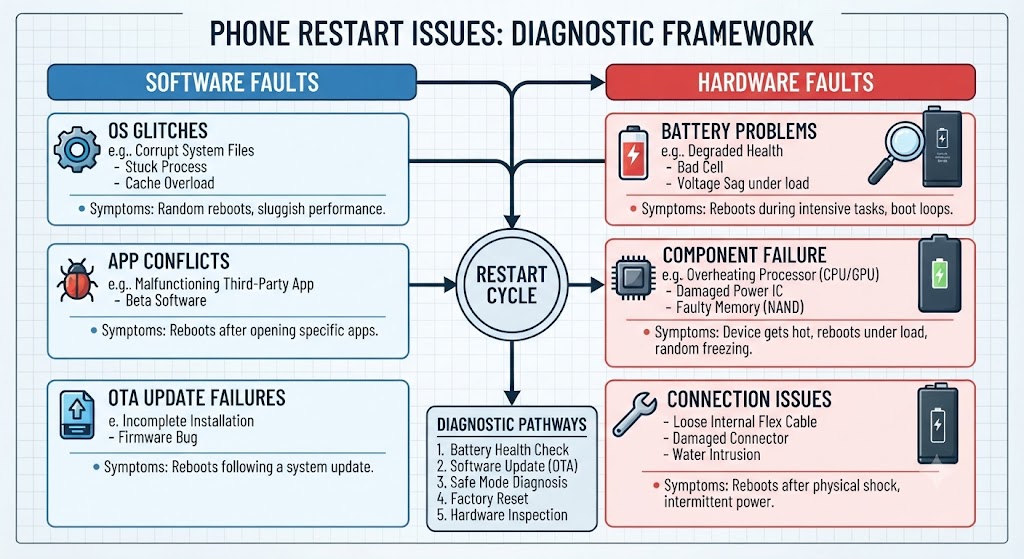
Smartphones are designed to run continuously without restarting on their own. If your device keeps rebooting unexpectedly, it’s a clear sign that something is preventing the operating system from functioning properly.
In many situations, the problem is software-related. Corrupted apps, outdated software, insufficient storage, malware, failed updates, or damaged system files can all trigger random restarts. Fortunately, these issues are often easy to fix using simple troubleshooting steps.
However, not every restart problem is caused by software. A worn-out battery, faulty power button, damaged charging circuit, motherboard failure, or liquid damage can interrupt your phone’s power supply and force it to restart repeatedly. Identifying whether the issue is caused by software or hardware is the first step towards applying the correct solution and avoiding unnecessary repair costs.
Common Signs Your Phone Has a Restart Problem
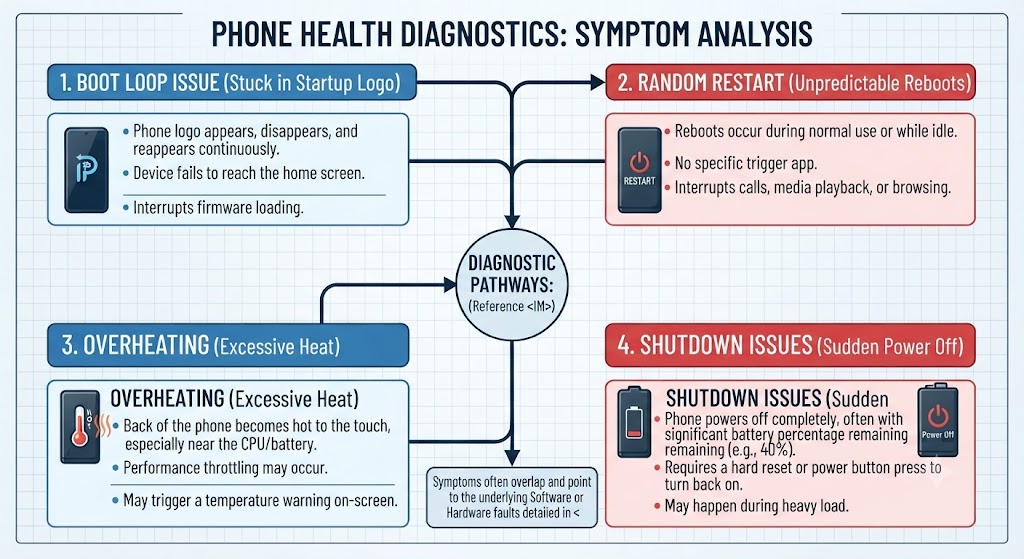
Restart issues don’t always look the same. Some phones reboot only once or twice a day, while others become trapped in an endless restart cycle that prevents them from loading the home screen.
Here are the most common symptoms users experience:
- Your phone randomly restarts throughout the day.
- The device gets stuck in a continuous boot loop.
- Your phone restarts after the manufacturer logo appears.
- The phone keeps turning off and back on automatically.
- Your device restarts while charging.
- The phone freezes before rebooting.
- Your smartphone restarts whenever you open certain apps.
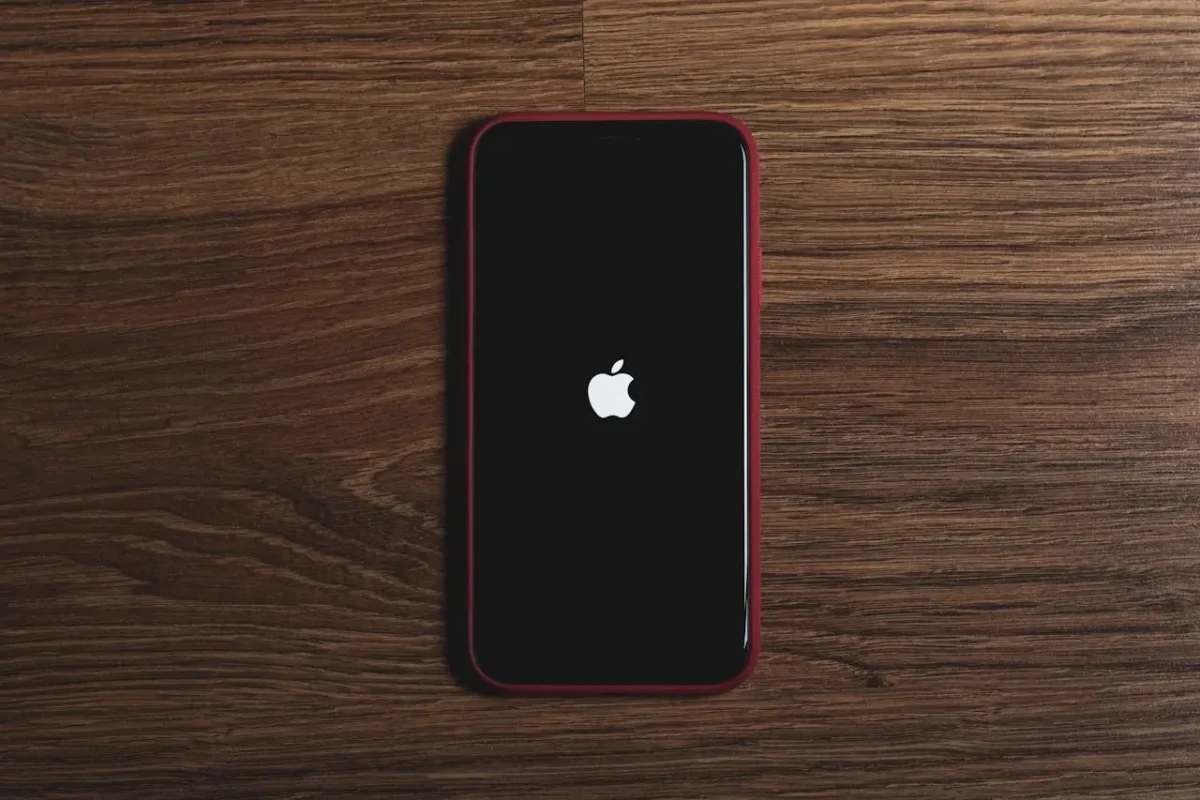
- The Apple logo or Android logo repeatedly appears and disappears.
- The battery percentage suddenly drops before the restart.
- Your phone becomes unusually hot before restarting.
- The restart problem began after a software update.
- The issue started after dropping the phone.
- The device keeps vibrating but never finishes booting.
- Your phone only works properly in Safe Mode.
- The restart issue has gradually become more frequent over time.
Some of these symptoms indicate software-related issues that can often be fixed at home, while others point towards battery failure, motherboard damage, or other hardware faults that require professional diagnosis.
What Causes a Phone to Keep Restarting?
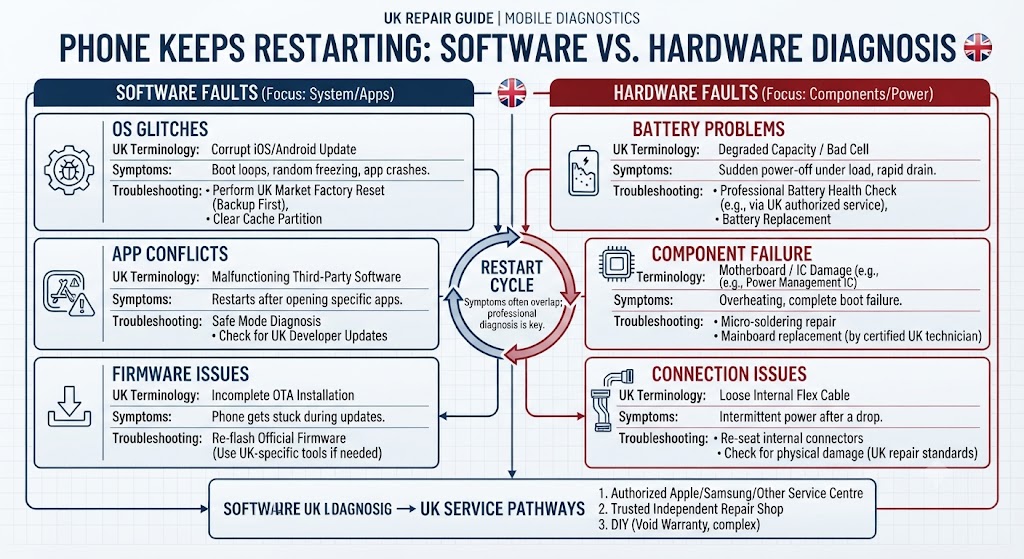
There are several reasons why your phone may keep restarting unexpectedly. Sometimes the problem is as simple as a buggy app or outdated software, while in other cases it can be caused by a failing battery, motherboard fault, or physical damage.
Before trying random fixes, it’s important to identify what’s triggering the restart issue. Understanding the root cause will help you choose the right solution, save time, and avoid unnecessary repair costs.
Below are the most common reasons why smartphones randomly restart or become stuck in a boot loop.
| Possible Cause | Type of Issue | Can You Fix It Yourself? |
|---|---|---|
| Software bug or system glitch | Software | Usually |
| Outdated Android or iOS version | Software | Yes |
| Corrupted system files | Software | Sometimes |
| Faulty third-party app | Software | Yes |
| Insufficient storage space | Software | Yes |
| Malware or harmful apps | Software | Usually |
| Corrupted system update | Software | Sometimes |
| Battery deterioration | Hardware | Usually not |
| Faulty power button | Hardware | No |
| Water or liquid damage | Hardware | No |
| Phone dropped or impact damage | Hardware | Usually not |
| Motherboard or power IC failure | Hardware | No |
15 Proven Ways to Fix a Phone That Keeps Restarting
Before assuming your phone needs repairing, work through the troubleshooting methods below. Most random restart problems are caused by software issues that can often be resolved within a few minutes using these proven fixes.
Fix 1. Restart Your Phone Properly
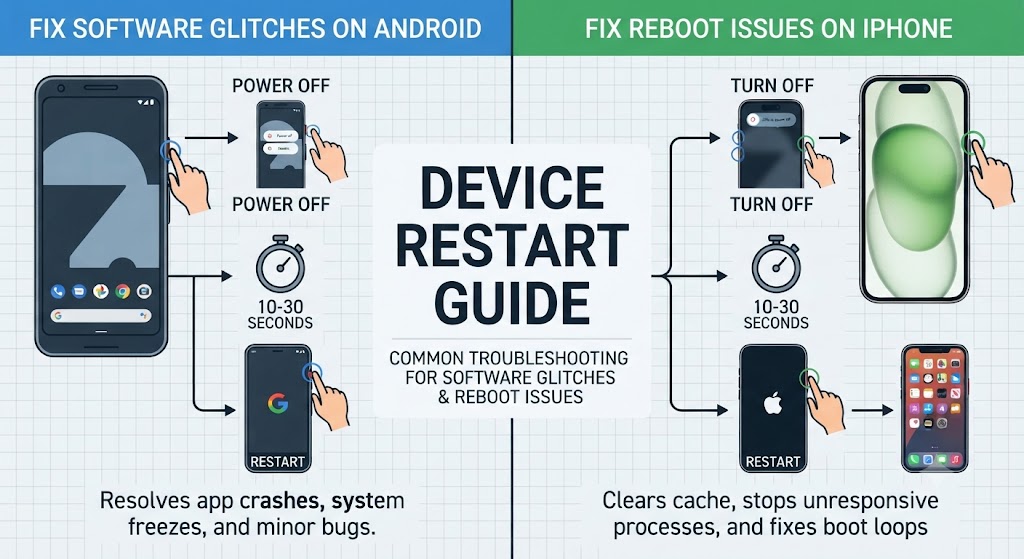
It may sound obvious, but performing a proper restart is often enough to resolve temporary software glitches that cause random restarts.
When your phone runs continuously for long periods, background processes, system services, and temporary memory files can become unstable. Restarting the device clears temporary errors, refreshes system resources, and allows the operating system to start with a clean memory state.
How to restart your phone
Android
- Press and hold the Power button.
- Tap Restart.
- Wait for the phone to reboot completely.
- Use your phone normally for a few minutes.
iPhone
- Press and hold the Side button together with either Volume button.
- Slide to power off.
- Wait around 30 seconds.
- Turn your iPhone back on.
If your phone no longer restarts after a manual reboot, the issue was most likely caused by a temporary software conflict rather than a hardware fault.
Fix 2. Check for Software Updates
Outdated operating systems are one of the most common reasons why smartphones develop stability issues, including random restarts. Manufacturers regularly release Android and iOS updates to fix software bugs, improve security, and enhance overall system performance.
Installing the latest software update may resolve reboot loops, unexpected shutdowns, and other system-related problems without requiring any hardware repairs.
Android
- Open Settings
- Tap Software Update
- Select Download and Install
iPhone
- Open Settings
- Tap General
- Select Software Update
Once the update has finished installing, restart your phone and monitor it for several hours to see whether the restart problem has been resolved.
Fix 3. Remove Recently Installed Apps
If your phone only started restarting after installing a new application, that app could be causing the problem. Poorly optimised apps, incompatible software, or apps downloaded from unofficial sources can interfere with your phone’s operating system and trigger random reboots.
Try uninstalling any apps you installed shortly before the problem began. Once removed, restart your phone and check whether the device continues restarting. If the issue disappears, you’ve likely identified the source of the problem.
Fix 4. Free Up Storage Space
A phone with very little available storage can struggle to run essential system processes, sometimes leading to freezing, crashes, and unexpected restarts.
Delete unnecessary apps, duplicate photos, old videos, downloaded files, and other large items to create additional storage space. Once you’ve freed up storage, restart your phone and check whether system stability has improved.
Fix 5. Boot Your Phone into Safe Mode (Android)
If your phone keeps restarting after installing a new app, the problem may not be your phone at all-it could be caused by a faulty third-party application.
Safe Mode temporarily disables all downloaded apps and allows only the original system apps to run. This makes it one of the best ways to determine whether a recently installed app is triggering the random restarts.
If your phone works normally in Safe Mode, you’ve identified that the issue is software-related rather than a hardware fault.
How to Enter Safe Mode (Android)
Although the exact steps vary slightly between manufacturers, the general process is:
- Press and hold the Power button.
- Touch and hold Power Off until the Safe Mode option appears.
- Tap Safe Mode.
- Wait for the phone to restart.
You’ll usually see “Safe Mode” displayed in the corner of the screen once it has successfully loaded.
What to Do Next
Use your phone for a while in Safe Mode. If the restarting problem disappears:
- A recently installed app is likely causing the issue.
- Restart your phone normally.
- Uninstall any apps installed just before the restarting began.
- Remove suspicious battery optimisation, cleaning, antivirus, or performance booster apps first.
If your phone still keeps restarting in Safe Mode, the problem is much more likely to be related to:
- Corrupted Android system files
- A failing battery
- Faulty hardware
- Motherboard damage
At that point, continue with the next troubleshooting steps below.
Fix 6. Check Your Battery Health
A worn-out or damaged battery is one of the most common hardware reasons why a phone continuously restarts.
As batteries age, they lose their ability to deliver stable power. During demanding tasks such as opening the camera, gaming, video recording, or charging, voltage can suddenly drop, causing the phone to reboot automatically.
This problem is especially common on older smartphones that have been used for several years.
Signs Your Battery May Be Failing
- Phone restarts when battery reaches 20–40%.
- Device switches off even though battery percentage appears high.
- Phone only works properly while plugged into the charger.
- Battery drains unusually fast.
- Phone becomes hot during normal use.
- Battery appears swollen or lifts the screen.
How to Check Battery Health
On iPhone
Go to:
Settings → Battery → Battery Health & Charging
Check the Maximum Capacity.
- 90-100% – Excellent
- 80-89% – Battery ageing normally
- Below 80% – Apple recommends replacement
On Android
Most Android phones don’t display battery health directly. You can:
- Use the built-in Device Care tool (Samsung).
- Run the phone’s diagnostic app.
- Have the battery professionally tested.
Fix 7. Scan Your Phone for Malware
Although it’s less common than software bugs, malware can also cause phones to restart unexpectedly. Malicious apps may consume excessive CPU power, overload memory, interfere with system processes, or repeatedly crash Android services.
This is more common if apps were installed from unofficial websites instead of the Google Play Store or Apple App Store.
Signs of Malware
- Random pop-up advertisements
- Unknown apps appearing automatically
- Phone becomes unusually slow
- Battery drains rapidly
- Device overheats
- Unexpected restarts
- High data usage
What You Should Do
- Uninstall suspicious apps.
- Run Google Play Protect (Android).
- Update your operating system.
- Restart the phone.
- Avoid installing APK files from unknown sources.
If malware has deeply affected system files, a factory reset may eventually be required.
Fix 8. Clear the System Cache (Android)
Android stores temporary system files in a cache partition to improve performance. Over time, these cached files can become corrupted after major Android updates or failed installations, leading to problems such as:
- Random restarting
- Freezing
- Boot loops
- Slow performance
- App crashes
Fortunately, clearing the system cache does not delete your personal files.
How to Clear Cache Partition
The exact steps vary by manufacturer, but generally:
- Turn off the phone.
- Press the required button combination to enter Recovery Mode.
- Select Wipe Cache Partition.
- Confirm.
- Restart the phone.
Don’t confuse Wipe Cache Partition with Factory Reset. Clearing the cache removes temporary system files only, while a factory reset erases all your personal data.
Many users notice improved stability immediately after clearing the cache following a major Android software update.
Fix 9. Remove the SD Card
If your Android phone uses a microSD card, it’s worth checking whether it’s responsible for the restarting problem. A damaged, slow, or corrupted memory card can cause apps to crash repeatedly, resulting in random reboots.
Symptoms of a Faulty SD Card
- Phone restarts while accessing photos.
- Gallery crashes frequently.
- Files disappear unexpectedly.
- Apps stored on the SD card won’t open.
- Device freezes before restarting.
What to Do
- Power off the phone.
- Remove the SD card.
- Restart the device.
- Use it normally for several hours.
If the restarting stops after removing the card, your SD card is likely corrupted or failing. Back up any recoverable files and replace it with a high-quality memory card.
Fix 10. Check for Overheating
Excessive heat is another major reason smartphones restart unexpectedly. When your phone becomes too hot, the processor automatically reduces performance or forces a restart to protect internal components from permanent damage.
Overheating may occur because of:
- Gaming for long periods
- Recording 4K or 8K video
- Fast charging
- Faulty batteries
- Background apps
- Direct sunlight
- Internal hardware faults
Signs Your Phone Is Overheating
- Phone feels extremely hot to touch.
- Performance becomes noticeably slower.
- Screen dims automatically.
- Apps close unexpectedly.
- Charging slows down.
- Device restarts by itself.
How to Reduce Overheating
- Remove the phone case temporarily.
- Close unused apps.
- Avoid using the phone while charging.
- Move out of direct sunlight.
- Install the latest software updates.
- Reduce screen brightness.
If your phone regularly becomes hot before restarting, overheating is likely the root cause rather than the restart itself.
Fix 11. Update Android or iOS
Running outdated software is one of the most common reasons a smartphone keeps restarting unexpectedly.
Manufacturers regularly release software updates that fix bugs, improve system stability, patch security vulnerabilities, and resolve known reboot issues. If your phone started restarting after an older update – or you’ve delayed installing recent updates – updating your device may solve the problem immediately.
How to Update Android
- Open Settings.
- Tap Software Update or System.
- Select Download and Install.
- Restart your phone after the update finishes.
How to Update iPhone
- Open Settings.
- Tap General.
- Select Software Update.
- Download and install the latest version of iOS.
Expert Tip
If your phone started restarting immediately after installing a new update, wait a few days before assuming it’s a hardware problem. Manufacturers often release follow-up patches to fix newly discovered software bugs.
Fix 12. Reset All Settings
If updating your device doesn’t solve the problem, resetting your phone’s settings is the next safe troubleshooting step. Unlike a factory reset, Reset All Settings does not delete your personal files, photos, videos, contacts, or apps.
Instead, it restores system settings such as:
- Wi-Fi settings
- Bluetooth connections
- Network settings
- Privacy permissions
- Keyboard preferences
- Accessibility settings
If an incorrect configuration is causing your phone to restart, this reset often resolves the issue.
On Android
Go to:
Settings → System → Reset Options → Reset Settings
(Menu names may vary depending on the manufacturer.)
On iPhone
Go to:
Settings → General → Transfer or Reset iPhone → Reset → Reset All Settings
After the reset, restart your phone and monitor it for several hours.
Fix 13. Perform a Factory Reset (Last Resort)
If your phone keeps restarting after trying every troubleshooting step in this guide, a factory reset is the final software solution. A factory reset completely reinstalls the operating system and removes:
- Apps
- Photos
- Videos
- Messages
- Downloads
- Personal settings
Because it erases everything, always back up your data before continuing.
Before Performing a Factory Reset
- Back up photos
- Save contacts
- Sync important files
- Remember passwords
- Charge the battery above 50%
After resetting the device, do not immediately restore your backup.
Instead, use the phone as a new device for a short period. If the restarting problem disappears, the issue was likely caused by corrupted software or a problematic app.
However, if your phone still keeps restarting after a factory reset, the fault is almost certainly hardware-related.
Fix 14. Check SIM Card or Network-Related Issues
Sometimes a phone keeps restarting due to SIM card errors or network-related system conflicts. A damaged SIM card, improperly inserted SIM tray, or network configuration bug can occasionally cause system instability, especially on Android devices.
When the phone repeatedly tries to reconnect to the mobile network, it can overload system processes and trigger random restarts.
What You Should Do:
- Turn off your phone completely
- Remove the SIM card and reinsert it properly
- Try using a different SIM card
- Reset network settings (Wi-Fi, Mobile Data, Bluetooth)
- Test the phone without SIM for a few hours
When This Fix Works:
If your phone stops restarting after removing the SIM card, the issue may be related to:
- Faulty SIM card
- Damaged SIM tray
- Network carrier configuration issue
In this case, replacing the SIM or contacting your network provider may resolve the issue without any repair cost.
Fix 15. Inspect for Internal Hardware Loose Connections (Advanced Issue)
If your phone has been dropped, repaired before, or exposed to pressure, internal components may become slightly loose. Even a small disconnection between the battery, motherboard, or power IC can cause continuous restarting.
This is one of the most overlooked but serious causes of reboot loops.
Common Internal Issues:
- Loose battery connector
- Partially detached power button flex cable
- Unstable motherboard connection
- Damaged charging IC connection
Warning Signs:
- Phone restarts when slightly moved
- Device works only in certain positions
- Restarting started after physical impact or repair
- Random shutdowns with no pattern
What You Should Do:
- Avoid pressing or bending the phone
- Do not open the device yourself (risk of damage)
- Get professional diagnostic inspection
At this stage, software fixes will not help. A technician must open the device and properly inspect internal connections using diagnostic tools.
Is It a Software Problem or a Hardware Fault?
One of the biggest questions users ask is whether random restarting is caused by software or damaged hardware.
The table below makes it easier to identify the most likely cause.
| Signs of a Software Problem | Signs of a Hardware Problem |
|---|---|
| Restarting began after an app installation | Restarting started after the phone was dropped |
| Problem appeared after a software update | Phone suffered water damage |
| Safe Mode fixes the issue | Phone restarts even in Safe Mode |
| Factory Reset solves the problem | Factory Reset doesn’t help |
| Restarting happens occasionally | Phone restarts continuously |
| Apps crash before restarting | Battery swelling or overheating |
| Device works normally after clearing cache | Random shutdowns even with full battery |
| No visible physical damage | Cracked housing or damaged internal components |
Average UK Repair Costs for Phones That Keep Restarting
If the issue turns out to be hardware-related, repair costs vary depending on the faulty component and your phone model.
| Repair Type | Average UK Price |
|---|---|
| Battery Replacement | £39-£99 |
| Charging Port Repair | £49-£99 |
| Power Button Repair | £49-£89 |
| Software Recovery | £29-£69 |
| Motherboard Repair | £89-£249 |
Note: Prices vary depending on the phone model, parts required, and the complexity of the repair.
Android Phone Keeps Restarting
If your Android phone keeps restarting, the issue is often caused by software glitches, corrupted cache files, incompatible apps, low storage, or a failing battery. Popular brands including Samsung, Google Pixel, Huawei, OnePlus, Xiaomi, Oppo, Motorola, and Sony can all experience unexpected reboot problems.
Start by restarting your device, updating Android, removing recently installed apps, clearing the system cache, and booting into Safe Mode. If your phone continues restarting even after a factory reset, the problem is likely hardware-related, such as a faulty battery, damaged charging circuit, or motherboard issue.
iPhone Keeps Restarting
If your iPhone keeps restarting unexpectedly, don’t assume the device needs replacing. In many cases, random rebooting is caused by iOS bugs, incomplete software updates, battery degradation, low storage space, corrupted system files, or incompatible applications. Whether you own an iPhone 11, iPhone 12, iPhone 13, iPhone 14, iPhone 15, or the latest iPhone models, the troubleshooting process is generally the same.
Start by updating to the latest version of iOS, checking Battery Health, freeing up storage, removing recently installed apps, and resetting all settings. If the problem continues, back up your data and perform a factory reset to rule out software corruption.
If your iPhone still keeps restarting after a factory reset – or the issue started after being dropped, exposed to water, or fitted with a non-genuine replacement part – the fault is likely hardware-related. Common causes include a worn-out battery, faulty charging IC, damaged logic board, power management IC (PMIC) failure, or internal motherboard damage.
At iExpert Repairs, our experienced technicians use professional diagnostic equipment to accurately identify the root cause before recommending any repair. This ensures your iPhone receives the correct solution without unnecessary part replacements, saving both time and money.
When Should You Seek Professional Repair?
If you’ve completed every troubleshooting step in this guide and your phone still keeps restarting, the problem is unlikely to be something you can fix at home.
Professional diagnosis is recommended if:
- Your phone keeps restarting after a factory reset.
- The device won’t stay on long enough to use normally.
- The restarting began after being dropped.
- The phone has been exposed to water.
- The battery is swollen or overheating.
- The phone only works while connected to the charger.
- The device is stuck in a continuous boot loop.
- The restarting problem is becoming more frequent.
At iExpert Repairs, our certified technicians carry out comprehensive diagnostics to determine whether the issue is caused by software, battery failure, charging components, or motherboard damage. We repair iPhones, Samsung Galaxy devices, Google Pixel phones, Huawei, OnePlus, Xiaomi, and many other leading smartphone brands using premium-quality replacement parts. Most repairs are completed with a fast turnaround and are backed by a 12-month warranty, giving you confidence that your device is repaired correctly the first time.
FAQs About a Phone That Keeps Restarting
1. Why does my phone keep restarting randomly?
If your phone keeps restarting randomly, it’s usually caused by software bugs, a faulty app, insufficient storage, battery degradation, overheating, corrupted system files, or hardware damage. If the problem started after a software update, restarting the device and installing the latest update may resolve it. However, if your phone continues rebooting after a factory reset or following a drop or water damage, the issue is likely hardware-related and should be professionally diagnosed.
2. How do I stop my phone from constantly restarting?
Start by restarting your device manually, updating Android or iOS, removing recently installed apps, checking battery health, freeing up storage, and scanning for malware. If the issue continues, reset all settings or perform a factory reset after backing up your data. If none of these solutions work, professional repair may be required.
3. Why does my Android phone keep restarting?
Android phones may restart because of corrupted cache files, outdated software, app conflicts, malware, overheating, battery problems, or motherboard faults. Booting into Safe Mode can help determine whether a third-party app is causing the issue. If the problem persists after a factory reset, hardware diagnostics are recommended.
4. Why does my iPhone keep restarting?
An iPhone may keep restarting due to iOS bugs, battery degradation, failed software updates, low storage, damaged charging components, or logic board faults. Updating iOS, checking Battery Health, and resetting all settings often resolve software-related problems. Persistent rebooting after these steps usually indicates a hardware issue.
5. Why does my Samsung phone keep restarting?
Samsung Galaxy phones can restart unexpectedly because of One UI software bugs, corrupted cache files, faulty applications, overheating, battery deterioration, or hardware damage. Clearing the system cache, updating the software, and testing the device in Safe Mode are recommended before seeking professional repair.
6. Can a bad battery cause a phone to keep restarting?
Yes. A failing battery is one of the most common causes of random restarts, especially on older smartphones. As batteries wear out, they may no longer supply stable voltage, causing the phone to reboot unexpectedly. Replacing the battery often resolves this issue.
7. Can overheating make my phone restart?
Yes. Smartphones are designed to protect internal components from excessive heat. If the processor or battery reaches unsafe temperatures, the phone may automatically restart or shut down. Allow the device to cool down and identify what’s causing the overheating before using it again.
8. Why does my phone keep restarting after a software update?
Sometimes a software update may install incorrectly or create compatibility issues with existing apps. Restarting the phone, installing any additional updates, clearing the system cache (Android), or resetting all settings can often resolve update-related restart problems.
9. Can malware cause a phone to restart repeatedly?
Yes. Although uncommon, malicious apps or malware can cause random restarts, freezing, excessive battery drain, and poor performance. Installing apps only from trusted sources and running a reputable security scan can help eliminate malware-related issues.
10. Will a factory reset fix a phone that keeps restarting?
A factory reset can resolve restart issues caused by corrupted software, system errors, or damaged settings. However, if your phone continues restarting after the reset, the fault is likely hardware-related, such as a defective battery, charging IC, or motherboard problem.
11. Why does my phone keep restarting while charging?
If your phone restarts only while charging, the problem may be caused by a damaged charging cable, faulty charger, dirty charging port, worn battery, or charging circuit failure. Try using a certified charger first. If the issue continues, professional diagnosis is recommended.
12. Why does my phone keep restarting after being dropped?
A drop can damage internal components such as the battery connector, motherboard, charging IC, or power management circuit. Even if there is no visible external damage, internal hardware faults can cause continuous restart loops that require professional repair.
13. Can water damage cause my phone to keep restarting?
Yes. Water or moisture can damage internal circuits, create short circuits, and affect the battery or motherboard. A phone that keeps restarting after liquid exposure should be switched off immediately and inspected by a qualified technician as soon as possible.
14. Why does my phone keep restarting when the battery is low?
A weak or worn-out battery may struggle to provide enough power when the charge level drops, causing unexpected shutdowns or restarts. Replacing an ageing battery is often the most effective solution if this only happens at low battery percentages.
15. How do I know if my phone restart issue is software or hardware related?
If your phone works normally after updating the software, removing apps, or performing a factory reset, the issue was likely software-related. However, if the restart loop continues after a factory reset or started following physical damage or water exposure, the fault is most likely hardware-related.
16. What is a boot loop on a smartphone?
A boot loop occurs when a phone repeatedly displays the startup logo, restarts, and never reaches the home screen. Boot loops are commonly caused by corrupted software, failed updates, damaged firmware, battery issues, or motherboard faults.
17. Is it safe to use a phone that keeps restarting?
No. Frequent restarting can indicate serious software corruption or hardware failure. Continuing to use the device may increase the risk of data loss or further internal damage. It’s best to back up your data and diagnose the issue as soon as possible.
18. How much does it cost to repair a phone that keeps restarting in the UK?
The repair cost depends on the underlying cause. Software repairs are generally less expensive than hardware repairs. Battery replacements, charging circuit repairs, or motherboard repairs vary depending on the phone model and the complexity of the repair.
19. How long does it take to repair a phone that keeps restarting?
Many software issues can be resolved within an hour, while battery replacements are often completed the same day. More complex motherboard or power management repairs may take between one and three working days, depending on the device and parts availability.
20. Can iExpert Repairs fix phones that keep restarting?
Yes. At iExpert Repairs, our certified technicians diagnose and repair restart issues affecting iPhone, Samsung Galaxy, Google Pixel, Huawei, OnePlus, Xiaomi, Oppo, Motorola, and many other smartphone brands.
Conclusion
A phone that keeps restarting doesn’t always mean your device has reached the end of its life. In many cases, the issue can be resolved by updating your software, removing faulty apps, clearing cache files, checking battery health, freeing up storage, or resetting your phone’s settings.
However, if your smartphone continues rebooting after completing all the troubleshooting steps – or the problem began after accidental damage or water exposure – the fault is likely hardware-related. Acting quickly can help prevent additional damage, protect your data, and reduce repair costs.
By following the solutions in this guide, you’ll be able to identify whether your phone’s restart issue is caused by software or hardware and decide the most effective next step.
Back to posts