Introduction
If you’re wondering how much to fix an iPad screen, you’re not alone. A cracked or damaged iPad display is one of the most common tablet repairs, and the cost depends on several factors, including your iPad model, the type of screen damage, and whether only the front glass or the entire display needs replacing. Understanding these factors can help you estimate repair costs before choosing a repair service.
Older iPad models are generally less expensive to repair because the glass and display can sometimes be replaced separately. In contrast, newer iPad Air Models and iPad Pro models often require a complete display assembly replacement, making repairs more expensive. The final price can also vary depending on whether you choose Apple or a reputable independent repair specialist and the quality of replacement parts used.
This guide provides accurate, up-to-date information based on current UK repair pricing and industry best practices. You’ll learn how iPad screen repair costs vary by model, what affects the overall price, the difference between glass-only repairs and full display replacements, and whether repairing your iPad is the most cost-effective option.
How Much Does It Cost to Fix an iPad Screen?
The cost of fixing an iPad screen in the UK typically ranges from £50 to over £500, depending on the model and the extent of the damage.
Older entry-level iPads usually have a separate glass digitiser, allowing technicians to replace only the cracked glass if the LCD underneath remains undamaged. This keeps repair costs relatively low.
On newer iPad Air and iPad Pro models, however, Apple uses fully laminated displays where the glass, digitiser, and LCD or OLED panel are bonded together. Even a small crack in the front glass may require replacing the entire display assembly, making repairs considerably more expensive.
Below is a general guide to typical UK repair costs.
| iPad Type | Typical UK Repair Cost |
|---|---|
| Older iPad | £50-£120 |
| iPad 7th-10th Generation | £70-£180 |
| iPad Mini Models | £70-£220 |
| iPad Air Models | £90-£320 |
| iPad Pro Models | £99-£550+ |
Please note: These are estimated market prices. The final cost depends on your specific iPad model, the severity of the damage, and the quality of replacement parts chosen.
What Determines the Cost of an iPad Screen Repair?
Several factors influence how much you’ll pay to repair an iPad screen.
1. Your iPad Model
The biggest factor is the model itself.
Entry-level iPads generally cost less to repair because replacement components are widely available. Premium models such as the iPad Pro feature advanced display technologies that significantly increase repair costs.
For example:
- iPad 6th Generation repairs are usually much cheaper than
- iPad Air 5
- iPad Pro 11-inch
- iPad Pro 12.9-inch
This is one reason why obtaining an accurate quote based on your exact model is important.
2. Type of Screen Damage
Not every cracked screen requires the same repair. Common types of damage include:
- Cracked outer glass
- Broken digitiser
- Dead pixels
- Black screen
- Flickering display
- Touch not responding
- LCD bleeding
- Display lines
- Complete display failure
If your touchscreen has stopped responding after being dropped, it’s worth reading our guide on Phone Touch Screen Not Responding? before deciding whether a replacement is necessary.
3. Glass-Only Repair vs Full Display Replacement
Many customers assume every cracked screen needs a complete replacement. In reality, some older iPads allow technicians to replace only the front glass, which is considerably cheaper. However, many newer iPads require replacing:
- Glass
- Touch digitiser
- LCD or OLED panel
as one complete display assembly. This is why two iPads with similar cracks may have very different repair costs.
4. Replacement Part Quality
The quality of replacement parts also affects pricing. Generally, repair providers offer:
- Genuine Apple parts (where available)
- OEM-quality components
- High-quality aftermarket displays
- Budget replacement screens
Lower-cost parts may reduce the repair price but can sometimes affect brightness, colour accuracy, touch responsiveness, or long-term durability. Choosing a trusted repair specialist that uses high-quality components is often the better long-term investment.
5. Repair Provider
Where you choose to have your iPad repaired can significantly affect the final bill. Options include:
- Apple
- Apple Authorised Service Providers
- Independent repair specialists
- Local repair shops
- Mail-in repair services
Independent repair centres often provide competitive pricing, faster turnaround times, and warranties while maintaining high repair standards.
Key Takeaways
Before requesting a repair quote, make sure you know:
- Your exact iPad model
- Whether only the glass is cracked or the display is damaged
- If the touchscreen still works
- Whether there are black spots, coloured lines, or flickering
- The type of replacement parts being offered
- The warranty included with the repair
Having this information helps you compare repair options more accurately and avoid unexpected costs.
Average iPad Screen Repair Costs by Model
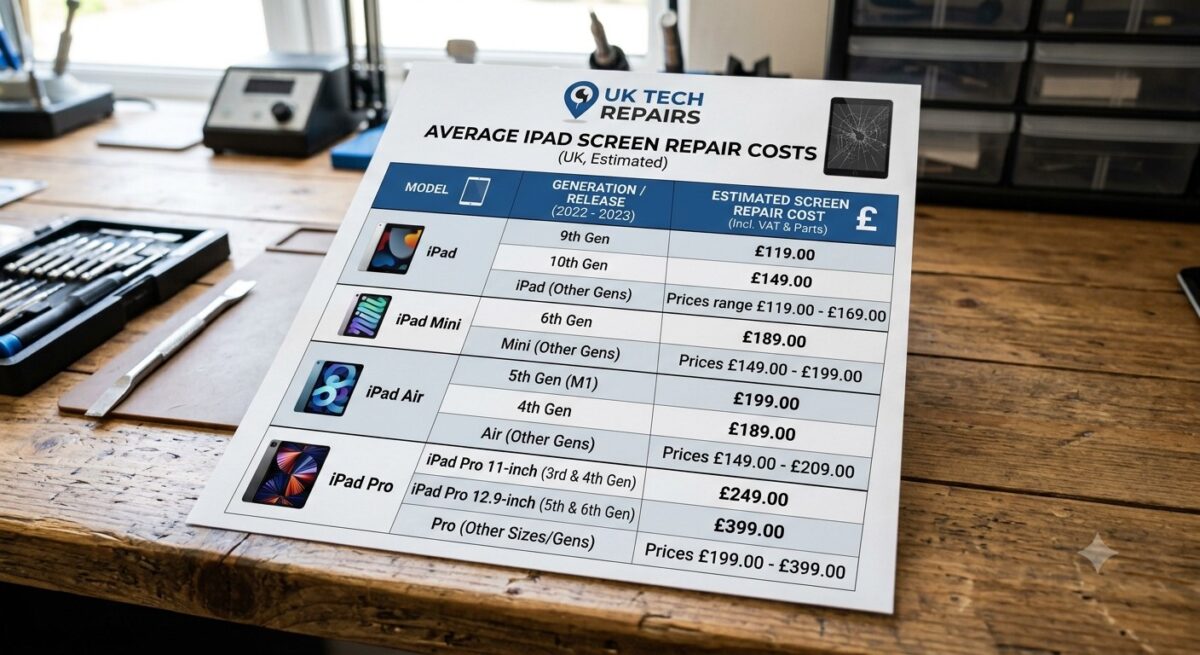
One of the biggest factors affecting the cost of an iPad screen repair is the model you own. Apple has released numerous iPad generations, each with different display technologies and repair requirements. Older iPads often feature a separate glass digitiser, while many newer iPad Air and iPad Pro models use fully laminated displays, making repairs more complex and expensive.
The prices below are general estimates for the UK repair market in 2026. Actual costs may vary depending on the repair provider, the quality of replacement parts used, and the extent of the damage.
Standard iPad Models
Standard iPads are generally the most affordable to repair because replacement parts are widely available and many older models allow glass-only repairs.
| iPad Model | Estimated Screen Repair Cost (UK) |
|---|---|
| iPad 5th Generation | £50-£90 |
| iPad 6th Generation | £55-£95 |
| iPad 7th Generation | £70-£120 |
| iPad 8th Generation | £75-£130 |
| iPad 9th Generation | £80-£140 |
| iPad 10th Generation | £120-£220 |
If you own one of these devices, choosing a specialist repair centre can often provide a quicker and more cost-effective solution than replacing the entire tablet.
iPad Mini Models
The compact design of the iPad Mini makes screen repairs slightly more expensive than some standard iPads, particularly on newer generations with laminated displays.
| iPad Mini Model | Estimated Repair Cost |
|---|---|
| iPad Mini 2 | £60-£100 |
| iPad Mini 3 | £60-£105 |
| iPad Mini 4 | £90-£160 |
| iPad Mini 5 | £120-£220 |
| iPad Mini 6 | £180-£320 |
Owners of newer Mini models should expect higher repair costs due to the advanced display assembly and increased labour involved.
iPad Air Models
The iPad Air range combines premium performance with thinner, more advanced displays. As a result, screen repairs are usually more expensive than standard iPads.
| iPad Air Model | Estimated Repair Cost |
|---|---|
| iPad Air (1st Gen) | £70-£110 |
| iPad Air 2 | £89-£180 |
| iPad Air 3 | £89-£190 |
| iPad Air 4 | £110-£300 |
| iPad Air 5 | £119-£290 |
If you’re using a newer Air model, professional installation is strongly recommended, as these displays require specialised tools and careful handling.
iPad Pro Models
The iPad Pro range features Apple’s most advanced displays, including high refresh rates and premium laminated screen technology. Consequently, these models are usually the most expensive to repair.
| iPad Pro Model | Estimated Repair Cost |
|---|---|
| 9.7-inch | £140-£220 |
| 10.5-inch | £170-£260 |
| 11-inch | £220-£420 |
| 12.9-inch | £250-£550+ |
For newer Pro models, replacing the display often involves changing the entire screen assembly rather than just the front glass, significantly increasing repair costs.
If you own an iPad Pro, using an experienced repair specialist with high-quality replacement parts can help maintain display performance and touch responsiveness.
Apple vs Independent iPad Screen Repair Costs
When your iPad screen breaks, you’ll generally have two repair options: Apple or an independent repair specialist. Both have advantages, but the overall cost, turnaround time, and flexibility can differ considerably.
Apple Repair Services
Apple repairs are carried out using genuine components and follow the company’s official repair procedures. If your iPad is covered by AppleCare+, your repair cost may be significantly reduced.
However, if your device is out of warranty or accidental damage isn’t covered, official repair prices can be substantially higher than those offered by independent repair providers.
Apple repairs may also involve replacing the entire display assembly, even when only the outer glass is cracked.
Independent Repair Specialists
A reputable independent repair centre can often provide:
- Competitive pricing
- Faster turnaround times
- High-quality replacement parts
- Warranty on repairs
- Repairs for older iPad models that Apple may no longer support
Many customers choose independent repair specialists because they offer excellent value while restoring the device to full working order. When selecting a repair provider, always check customer reviews, warranty terms, and the quality of the replacement components being used.
What Else Can Affect the Final Repair Price?
Even if two people own the same iPad model, the repair cost may not be identical. Several additional factors can influence the final quote.
Extent of the Damage
A small crack in the corner of the screen may require less work than an iPad with severe impact damage affecting the display, frame, and internal components.
Technicians will normally inspect the device to determine whether the damage is limited to the screen or if additional repairs are required.
Frame Damage
If the aluminium frame has become bent after a drop, fitting a new screen safely can be more difficult.
In some cases, technicians must straighten or repair the frame before installing the replacement display, increasing both labour time and repair costs.
Internal Component Damage
A heavy impact can damage more than just the screen. Your repair technician may also find issues with:
- The touchscreen digitiser
- Display connectors
- Front camera
- Face ID components (where applicable)
- Internal flex cables
- Battery
Identifying these problems early helps prevent repeat repairs later.
Replacement Part Quality
Not all replacement screens are manufactured to the same standard. Higher-quality components generally provide:
- Better brightness
- More accurate colours
- Smoother touch response
- Greater durability
- Improved long-term reliability
Although premium parts may cost slightly more initially, they often deliver better value over the lifespan of the device.
Labour Costs
Repair prices also reflect the skill and experience required to complete the job safely. Modern iPads use strong adhesives and delicate internal components, meaning professional repairs require specialist equipment and technical expertise.
For this reason, choosing the cheapest repair option isn’t always the best decision if it compromises quality or reliability.
Glass Repair vs Full Display Replacement
Many people assume that every cracked iPad screen requires a complete display replacement. In reality, the type of repair depends on your iPad model and the extent of the damage.
Older iPads often have a separate front glass (digitiser) and LCD, allowing technicians to replace only the cracked glass if the display underneath is still working correctly. This type of repair is generally more affordable.
Newer iPad Air and iPad Pro models, however, feature fully laminated displays where the glass, touch digitiser, and LCD or OLED panel are bonded together. Even a minor crack can require replacing the entire display assembly, which increases both the complexity and the overall repair cost.
When Is Glass-Only Repair Possible?
A glass-only repair may be suitable if:
- The LCD shows a clear image.
- The touchscreen responds normally.
- There are no black spots or dead pixels.
- No coloured lines appear on the display.
- The screen brightness remains consistent.
- The damage is limited to the outer glass.
Replacing only the glass is usually the most cost-effective option for compatible iPad models.
When Do You Need a Full Display Replacement?
A complete display replacement is normally required if your iPad has:
- A black or blank screen.
- Flickering or flashing display.
- Vertical or horizontal lines.
- Dead pixels.
- Ink-like black patches.
- An unresponsive touchscreen.
- Display discolouration.
- Internal screen damage caused by a heavy impact.
A qualified technician can inspect your iPad and recommend the most appropriate repair based on the condition of the display.
Signs Your iPad Screen Needs Immediate Repair
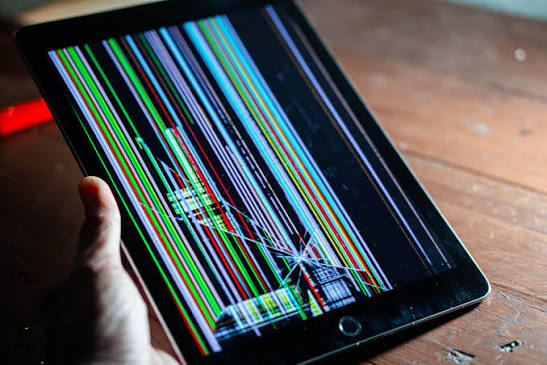
Not every cracked iPad screen requires immediate replacement, but some warning signs indicate that your device should be inspected by a professional as soon as possible. Ignoring these symptoms can lead to further damage, higher repair costs, and even permanent display failure.
Common signs include:
- A touchscreen that no longer responds accurately.
- Flickering or flashing display.
- Black spots or coloured lines on the screen.
- A shattered screen with sharp or loose glass.
- A black display even though the iPad is powered on.
- The screen lifting away from the frame.
- Dust or moisture entering through cracked glass.
- Ghost touches or random screen inputs.
If you notice any of these issues, arranging a professional inspection promptly can help prevent additional damage and reduce the likelihood of more expensive repairs.
Is It Worth Repairing a Cracked iPad Screen?
In most cases, yes. Repairing a cracked iPad screen is often much more affordable than replacing the entire device, especially if the iPad is otherwise in good working condition.
Professional screen repairs can restore:
- Touchscreen functionality
- Display clarity
- Device safety
- Resale value
- Everyday usability
If the battery, charging port, cameras, and internal hardware are all functioning correctly, investing in a quality screen repair is usually the most economical solution.
However, if your iPad has multiple faults – such as severe ipad water damage, motherboard issues, or extensive structural damage – you may want to compare the repair cost with the price of purchasing a newer model.
How Long Does an iPad Screen Repair Take?
The repair time depends on the iPad model, the availability of replacement parts, and the complexity of the repair. In general:
| Repair Type | Typical Turnaround Time |
|---|---|
| Glass-only repair | 1-3 hours |
| Full display replacement | 2-4 hours |
| Advanced repairs with additional damage | Same day to 3 working days |
Many independent repair centres can complete common iPad screen repairs on the same day, provided the required parts are in stock. If additional components need replacing, such as the battery or charging connector, the repair may take slightly longer.
Can You Repair an iPad Screen Yourself?
While DIY repair kits are available online, replacing an iPad screen is considerably more difficult than many people expect.
Modern iPads are assembled using strong adhesives, delicate flex cables, and tightly packed internal components. Opening the device without the correct tools or experience can easily lead to further damage.
DIY repairs also carry the risk of:
- Damaging the LCD.
- Tearing internal flex cables.
- Cracking the replacement screen during installation.
- Reducing water and dust resistance.
- Voiding any remaining warranty.
- Increasing the overall repair cost if professional assistance is needed afterwards.
For most users, having the repair carried out by an experienced technician is the safer and more reliable option.
How to Prevent Future iPad Screen Damage
Although accidents can’t always be avoided, taking a few preventative measures can significantly reduce the risk of damaging your iPad screen and help extend the life of your device.
To better protect your iPad:
- Use a high-quality protective case designed for your iPad model.
- Install a tempered glass screen protector for added impact resistance.
- Avoid placing heavy objects on top of your iPad.
- Keep your device away from the edges of tables and desks.
- Store your iPad safely when travelling.
- Avoid exposing it to extreme heat or cold.
- Clean the display regularly using a soft microfibre cloth.
- Keep liquids away from your device whenever possible.
These simple precautions can help minimise accidental damage, reduce future repair costs, and keep your iPad performing at its best.
How to Choose a Reliable iPad Repair Service
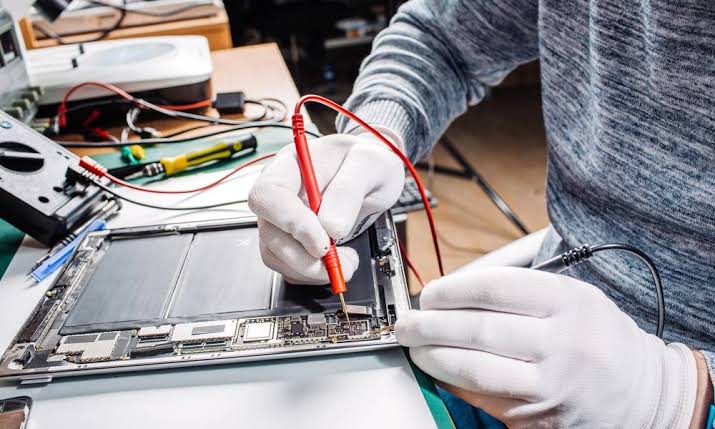
Not all repair providers offer the same level of quality. Choosing a trusted repair specialist helps ensure your iPad is repaired correctly and continues to perform as expected.
Before booking a repair, consider the following:
Check Customer Reviews
Look for consistently positive reviews that mention repair quality, turnaround times, customer service, and aftercare.
Ask About Replacement Parts
A reputable repair centre should clearly explain whether they use genuine, OEM-quality, or premium aftermarket components.
Confirm the Warranty
Most professional repair providers include a warranty covering replacement parts and workmanship, giving you additional peace of mind after the repair.
Compare More Than Just Price
The cheapest repair isn’t always the best value. Experienced technicians, quality components, and reliable aftercare often justify paying slightly more for a repair that lasts.
Choose Specialists With Experience
Repairing modern iPads requires specialist knowledge and equipment. An experienced technician is more likely to diagnose hidden damage and complete the repair safely.
FAQs About iPad Screen Repair Costs
. How much does it cost to fix an iPad screen in the UK?
The cost of repairing an iPad screen in the UK typically ranges from £50 to £550+, depending on the iPad model, the extent of the damage, and whether only the glass or the entire display needs replacing.
2. Why are some iPad screen repairs more expensive than others?
Repair costs vary because different iPad models use different display technologies. Newer iPad Air and iPad Pro models have laminated displays that are more expensive to replace than the separate glass and LCD used in many older iPads.
3. Can a cracked iPad screen be repaired without replacing the display?
Yes. If only the outer glass is damaged and the LCD and touchscreen are still functioning correctly, some older iPad models can have a glass-only repair. Newer models usually require a complete display replacement.
4. Is it cheaper to repair an iPad screen than buy a new iPad?
In most cases, yes. Screen repairs are usually far more affordable than replacing the entire device, especially if the iPad is otherwise in good working condition.
5. How long does an iPad screen repair usually take?
Many iPad screen repairs can be completed on the same day. Depending on the model and the repair required, the process typically takes between 1 and 4 hours.
6. Does Apple repair cracked iPad screens?
Yes. Apple offers screen repair services for eligible iPad models. If your device is covered by AppleCare+, the repair cost may be reduced. Out-of-warranty repairs are generally more expensive.
7. Is an independent repair shop a good alternative to Apple?
A reputable independent repair specialist can provide high-quality repairs, competitive pricing, faster turnaround times, and warranties, making them a popular choice for many iPad owners.
8. Can I continue using my iPad with a cracked screen?
Although your iPad may still function, using it with a cracked screen isn’t recommended. Cracks can spread, reduce touch sensitivity, and allow dust or moisture to enter the device.
9. Will repairing my iPad screen erase my data?
A standard screen replacement shouldn’t affect your data. However, it’s always advisable to back up your iPad before any repair as a precaution.
10. What is the difference between glass replacement and display replacement?
Glass replacement involves replacing only the outer glass when the LCD is still working. Display replacement includes replacing the glass, digitiser, and LCD or OLED assembly together.
11. Can Face ID or Touch ID stop working after a screen repair?
When repairs are performed correctly using compatible parts and proper procedures, Face ID or Touch ID should continue to work. However, severe impact damage before the repair can sometimes affect these components.
12. Are aftermarket iPad screens reliable?
High-quality aftermarket screens can provide excellent performance and value. The quality varies between suppliers, so it’s important to choose a trusted repair provider that uses premium replacement parts.
13. How do I know if my iPad needs a full screen replacement?
Signs include black spots, coloured lines, flickering, dead pixels, an unresponsive touchscreen, or a completely blank display. A technician can confirm the exact repair required after inspecting the device.
14. Is it worth repairing an older iPad?
If your iPad still meets your daily needs and only the screen is damaged, repairing it is often a cost-effective option compared with purchasing a new device.
15. Can I repair my iPad screen myself?
DIY repair kits are available, but iPad screen replacements require specialist tools and experience. Attempting the repair yourself may cause additional damage and increase the overall repair cost.
16. What should I do immediately after cracking my iPad screen?
Stop using the device if the glass is badly shattered, apply a temporary screen protector or clear tape if necessary to prevent further cracking, back up your data, and arrange a professional inspection as soon as possible.
17. Does AppleCare+ cover accidental screen damage?
AppleCare+ can reduce the cost of accidental damage repairs, although a service fee usually applies. Coverage depends on your plan and the terms in effect at the time of the repair.
18. Can a cracked iPad screen get worse over time?
Yes. Even a small crack can spread with daily use, pressure, or further impacts. Delaying repairs may also increase the risk of damage to the LCD or internal components.
19. How can I protect my iPad screen after it has been repaired?
Using a high-quality tempered glass screen protector and a durable protective case can help reduce the risk of future screen damage caused by accidental drops or impacts.
20. How do I choose the best iPad screen repair service?
Look for a repair provider with experienced technicians, positive customer reviews, high-quality replacement parts, transparent pricing, and a warranty on both parts and workmanship. Choosing a trusted ipad repair specialist helps ensure a reliable and long-lasting repair.
Conclusion
If you’re wondering how much to fix an iPad screen, the cost will depend on several factors, including your iPad model, the severity of the damage, and the type of replacement parts used. In the UK, most iPad screen repairs typically range from £50 for older models to £550 or more for premium iPad Pro devices with advanced laminated displays.
While it may be tempting to delay a repair, even a small crack can become more serious over time. Continued use of a damaged screen can lead to reduced touch sensitivity, display failure, or further internal damage, ultimately increasing the overall repair cost.
Before making a decision, it’s always advisable to have your iPad inspected by an experienced repair technician. A professional assessment can determine whether your device requires a simple glass replacement or a complete display assembly, helping you avoid paying for unnecessary repairs.
Choosing a trusted repair specialist who uses high-quality replacement parts and offers a warranty on both parts and workmanship can help restore your iPad’s performance, preserve its value, and extend its lifespan. Whether you own an iPad, iPad Mini, iPad Air, or iPad Pro, a timely repair is often the most cost-effective way to keep your device performing at its best.
Need a Professional iPad Screen Repair?
If your iPad screen is cracked, unresponsive, flickering, or completely damaged, don’t wait until the problem gets worse. A professional repair can restore your device quickly, protect it from further damage, and save you the expense of buying a new iPad.
At iExpert Repairs, our experienced technicians specialise in repairing all major iPad models using high-quality replacement parts, advanced repair techniques, and thorough post-repair testing. We offer fast turnaround times, competitive pricing, and warranty-backed repairs, giving you complete confidence that your device is in safe hands.
If, after a professional assessment, repairing your iPad is no longer the most cost-effective option, we’ve got you covered. iExpert Market offers a wide range of professionally tested refurbished iPhones, iPads, Samsung devices, and other smartphones, all carefully inspected, quality-checked, and backed by strict testing standards. It’s an affordable and reliable way to upgrade your device while saving significantly compared to buying new.
Whether you need an expert iPad screen repair or you’re looking for a high-quality refurbished device, iExpert Repairs and iExpert Market provide trusted, affordable solutions to help you get the best value for your money.
Back to posts