Introduction
Has your iPad started losing battery much faster than it used to? Does it switch off unexpectedly, take forever to charge, or struggle to last through a normal day? If so, you’re probably wondering how much does an iPad battery replacement cost in the UK and whether it’s worth repairing your device instead of replacing it.
The good news is that in many cases, a professional iPad battery replacement can restore your tablet’s battery life and performance at a fraction of the cost of buying a new iPad. Whether you own an iPad Pro, iPad Air, iPad Mini, or the standard iPad, replacing a worn-out battery is often one of the most cost-effective repairs available.
However, ipad battery replacement costs aren’t the same for every model. Prices vary depending on factors such as your iPad generation, battery size, repair complexity, replacement part quality, and whether you choose Apple or an independent repair specialist like iExpert Repairs.
In this complete UK guide, we’ll explain:
- Average iPad battery replacement costs
- Battery replacement prices by iPad model
- What affects the cost of replacing an iPad battery
- Signs your battery needs replacing
- Whether it’s worth repairing or replacing your iPad
- Apple vs independent repair comparisons
- Tips for extending battery life
- How iExpert Repairs provides fast, reliable, and affordable iPad battery replacement services across the UK.
If your iPad also refuses to charge, you may find our guide on “Why Is My iPad Not Charging?” helpful before booking a battery replacement.
How Much Does an iPad Battery Replacement Cost in the UK?
The average iPad battery replacement cost in the UK typically ranges from £59 to £199, depending on your iPad model, battery capacity, and the complexity of the repair.
Older standard iPads generally cost less to repair because replacement parts are more readily available and the repair process is simpler. Premium models such as the latest iPad Pro or iPad Air may cost more due to larger batteries, laminated displays, and more complex internal designs.
Professional repair centres also include labour, diagnostics, quality-tested replacement batteries, and warranty coverage, making them a safer and more reliable option than attempting a DIY repair.
Average iPad Battery Replacement Cost (UK)
| iPad Model | Typical Battery Replacement Cost |
|---|---|
| iPad | £59-£99 |
| iPad Mini | 64-£119 |
| iPad Air | £59-£149 |
| iPad Pro | £65-£159 |
Note: Prices vary depending on the exact iPad generation, battery condition, and whether any additional repairs are required.
If your iPad has multiple issues – such as a cracked display or charging port problem – it may be more cost-effective to have all repairs completed during the same visit. Our professional iPad Repair service can diagnose every issue before any work begins, helping you avoid unnecessary costs.
What Affects the Cost of an iPad Battery Replacement?
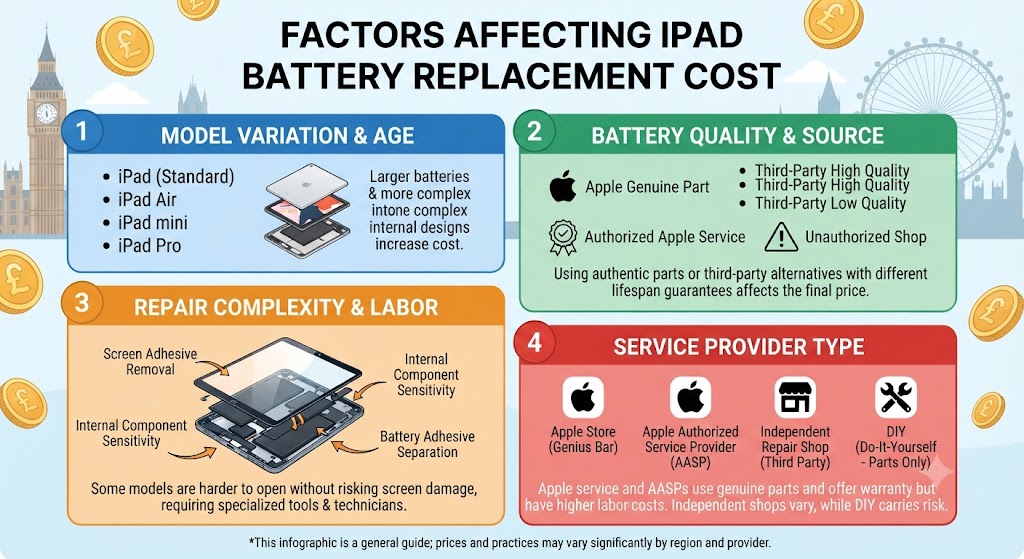
Not every iPad battery replacement costs the same. Several factors determine the final repair price, which is why it’s always worth getting a professional diagnostic before committing to a repair.
1. Your iPad Model
The biggest factor is the model you own.
For example:
- Entry-level iPads are generally the most affordable to repair.
- iPad Mini models have compact internal layouts that require extra precision.
- iPad Air models feature slimmer designs and larger batteries.
- iPad Pro models often include advanced display technology and more complex internal components, increasing repair time and cost.
Generally, newer and higher-spec iPads require more specialised repair techniques, which can affect pricing.
2. Battery Size and Capacity
Larger batteries cost more to replace because they contain more cells and require more complex installation.
For example, an iPad Pro battery is significantly larger than the battery found in a standard iPad, contributing to a higher replacement cost.
3. Quality of Replacement Parts
Battery quality has a major impact on both performance and safety. Professional repair centres use premium-quality replacement batteries designed to meet high performance and safety standards. Low-quality batteries may be cheaper initially but can lead to:
- Poor battery life
- Overheating
- Charging issues
- Unexpected shutdowns
- Reduced overall device performance
Choosing a reputable repair provider helps ensure your iPad remains reliable long after the repair.
4. Additional Repairs
Sometimes a failing battery isn’t the only issue. Your technician may also discover:
- A damaged charging port
- Liquid damage
- Display issues
- Internal connector damage
- Swollen battery causing screen separation
Addressing these issues during the same repair can often save time and reduce future repair costs.
5. Warranty and Repair Quality
The cheapest repair isn’t always the best value. A reputable repair provider typically includes:
- Professional diagnostics
- Experienced technicians
- High-quality replacement batteries
- Post-repair testing
- Warranty protection
- Ongoing customer support
These factors provide greater peace of mind and reduce the likelihood of repeat repairs.
Signs Your iPad Battery Needs Replacing
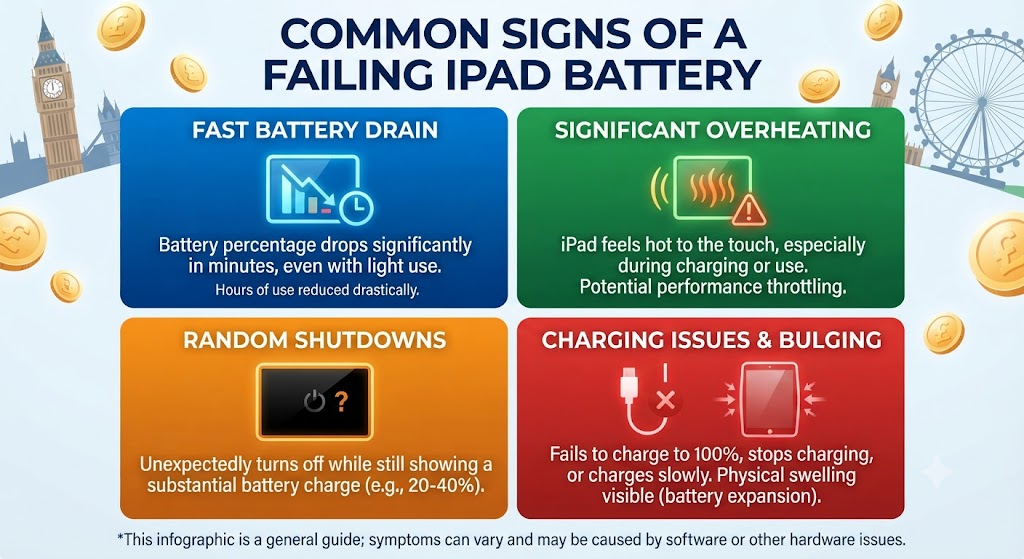
Every rechargeable battery gradually loses its ability to hold a full charge. Apple designs iPad batteries to retain a high percentage of their original capacity after hundreds of charge cycles, but over time, all lithium-ion batteries naturally degrade.
If your iPad is more than two or three years old and you’ve noticed a significant drop in battery life, it may be time to consider a professional battery replacement.
Here are the most common warning signs.
1. Your iPad Battery Drains Much Faster Than Before
One of the earliest signs of battery wear is noticeably shorter battery life. If your iPad once lasted all day but now requires charging after only a few hours of light use, the battery may no longer be able to store enough power.
Battery drain can also be caused by software problems or power-hungry apps. Before replacing the battery, it’s worth checking for background apps and updating iPadOS. If the issue persists, a professional battery test can determine whether the battery itself is at fault.
2. Your iPad Randomly Shuts Down
Does your iPad suddenly power off even though the battery indicator still shows 20%, 30%, or even 50% remaining? Unexpected shutdowns are often caused by an ageing battery that can no longer provide stable voltage under load.
This issue usually becomes more noticeable when:
- Using demanding apps
- Streaming videos
- Playing games
- Editing photos or videos
- Joining long video calls
If random shutdowns become frequent, replacing the battery is usually the most reliable long-term solution.
3. The Battery Takes Much Longer to Charge
Another common symptom is unusually slow charging. While charging speed also depends on your charger, cable, and charging port, an ageing battery can increase charging times significantly.
Before assuming the battery is faulty, check for:
- Damaged charging cables
- Faulty wall adapters
- Dirt or lint inside the charging port
- Software updates
4. Your iPad Overheats During Normal Use
Some warmth while charging is perfectly normal.
However, if your iPad becomes excessively hot during everyday activities like browsing, watching videos, or using productivity apps, the battery could be struggling to deliver power efficiently.
Excessive heat may also indicate:
- Internal battery degradation
- Background software issues
- Charging problems
- Hardware faults
A professional diagnostic can identify the exact cause before unnecessary repairs are carried out.
5. Your Battery Percentage Jumps Up and Down
An unstable battery indicator often suggests the battery is no longer reporting its remaining capacity accurately.
For example:
- 80% suddenly becomes 45%
- 30% drops to 5%
- Battery percentage increases after restarting
These inconsistent readings usually occur as the battery ages and its internal chemistry deteriorates.
6. Your iPad Feels Slower Than It Used To
Many people assume their iPad is simply getting old. In reality, a worn battery can affect overall performance by providing less stable power to internal components.
Replacing the battery often improves:
- General responsiveness
- App loading times
- Multitasking performance
- Overall reliability
7. The Battery Has Started Swelling
A swollen battery should never be ignored. As lithium-ion batteries age or become damaged, gases can build up inside the battery cells, causing them to expand.
Signs include:
- The display lifting away from the frame
- A bulging back panel
- Gaps around the edges
- Pressure marks on the screen
- Difficulty pressing buttons
A swollen battery is a safety risk and should be replaced as soon as possible by qualified technicians. Continuing to use the device may damage the display, internal components, or charging system.
How Long Does an iPad Battery Last?
Apple’s lithium-ion batteries are designed to provide years of reliable performance.
For most users, an iPad battery lasts between 3 and 5 years, depending on usage habits, charging patterns, and environmental conditions. Heavy users who rely on their iPad for work, gaming, video editing, or streaming every day may notice battery degradation sooner than occasional users.
Typical lifespan depends on factors such as:
- Daily screen time
- Charge frequency
- Charging habits
- Ambient temperature
- Battery health
- Overall device age
With proper care, many iPads continue performing well long after the battery has been replaced.
What Are Charge Cycles?
Battery lifespan is measured using charge cycles rather than simply the number of times you plug your iPad in. One charge cycle equals using a total of 100% of the battery’s capacity.
For example:
- Using 50% today and recharging
- Then using another 50% tomorrow
equals one complete charge cycle.
Most modern iPad batteries are designed to retain a high percentage of their original capacity after around 1,000 charge cycles, although actual lifespan varies depending on usage and charging habits.
How Can You Make Your iPad Battery Last Longer?
Although every battery eventually wears out, good charging habits can significantly extend its lifespan.
1. Keep Your iPad Updated
Apple regularly releases iPadOS updates that improve battery efficiency, optimise background processes, and fix software bugs affecting power consumption.
Installing the latest updates can help maintain healthy battery performance.
2. Avoid Extreme Temperatures
Heat is one of the biggest enemies of lithium-ion batteries. Avoid leaving your iPad:
- Inside a hot car
- In direct sunlight
- Near heaters
- In freezing conditions for extended periods
Keeping your device within normal operating temperatures helps preserve long-term battery health.
3. Use High-Quality Chargers
Cheap or uncertified charging accessories may provide unstable power and could shorten battery life over time. Using high-quality or certified chargers and cables helps ensure safe, consistent charging.
4. Don’t Let the Battery Stay at 0% for Long Periods
Leaving an iPad completely discharged for days or weeks can put unnecessary stress on the battery. Whenever possible, recharge the device before it remains fully depleted for an extended period.
5. Reduce Unnecessary Background Activity
Simple adjustments can reduce battery drain, including:
- Lowering screen brightness
- Disabling unused location services
- Closing unnecessary background apps
- Turning off Bluetooth and AirDrop when not needed
- Enabling Low Power Mode when appropriate
These small changes won’t stop battery ageing, but they can help maximise the time between charges.
Can You Replace an iPad Battery Yourself?
Technically, yes – but for most people, DIY iPad battery replacement isn’t recommended.
Unlike some older electronics, iPads are built with tightly sealed enclosures, strong adhesive, delicate display cables, and compact internal components. Opening the device without the right tools or experience can easily cause additional damage.
Common risks include:
- Cracking the display during removal
- Damaging the touch digitiser or LCD
- Tearing delicate ribbon cables
- Puncturing the battery, which can create a fire hazard
- Causing charging or motherboard issues
- Losing any remaining warranty coverage
Professional repair technicians use specialist tools, controlled heating equipment, and tested replacement batteries to carry out the repair safely. If your iPad also has a cracked screen or charging issue, repairing everything at the same time can often save both time and money.
Apple vs Independent iPad Battery Replacement
When your iPad battery starts failing, you’ll generally have two options: using Apple’s official repair service or choosing a trusted independent repair specialist such as iExpert Repairs.
Both options have advantages, but the right choice depends on your budget, repair urgency, warranty preferences, and the age of your iPad.
1. Apple Battery Replacement
Apple offers battery replacement services for eligible iPad models using genuine Apple parts.
This option may be suitable if:
- Your iPad is still covered by AppleCare+.
- You prefer using Apple’s official repair network.
- You don’t mind paying premium repair prices.
- You’re happy to wait for Apple’s repair turnaround.
However, depending on your location and model, repairs may take longer than expected, and older iPads may no longer qualify for official service.
2. Independent iPad Repair Specialists
Professional independent repair centres such as iExpert Repairs offer a practical alternative for many UK customers.
Benefits typically include:
- Competitive pricing
- Faster turnaround times
- Same-day repairs on many models
- High-quality replacement batteries
- Professional diagnostics
- Warranty on repairs
- Friendly local support
Independent repair specialists are often the preferred choice when repairing older iPads that are no longer covered by Apple’s warranty or when customers want a quicker and more affordable solution.
3. Apple vs Independent Repair Comparison
| Feature | Apple Repair | iExpert Repairs |
|---|---|---|
| Genuine or Premium Parts | Genuine Apple parts | Premium quality replacement parts |
| Repair Speed | Varies by model and location | Same-day service available on many models |
| Free Diagnostics | Limited | Included before repair |
| Competitive Pricing | Higher | More affordable |
| UK Mail-In Service | Available for selected services | UK-wide mail-in repair available |
| Warranty | Apple warranty terms apply | 12-month warranty on repairs |
| Personal Customer Support | Standard | Direct support from experienced technicians |
Expert Tip: If your iPad is several years old and no longer covered by AppleCare+, a professional independent repair can often provide excellent value while restoring your device’s battery life and performance.
iPad Battery Replacement Cost by Model
1. Standard iPad Battery Replacement Cost
The standard iPad range is typically the most affordable to repair. Common models include:
- iPad (5th Generation)
- iPad (6th Generation)
- iPad (7th Generation)
- iPad (8th Generation)
- iPad (9th Generation)
- iPad (10th Generation)
- iPad (11th Generation)
Typical battery replacement cost: £59-£99
Older entry-level iPads remain excellent devices for school, streaming, browsing, and everyday use, making battery replacement a worthwhile investment.
2. iPad Mini Battery Replacement Cost
The iPad Mini features a compact internal design that requires additional care during repair. Supported models include:
- iPad Mini 2
- iPad Mini 3
- iPad Mini 4
- iPad Mini 5
- iPad Mini 6
- iPad Mini 7
Typical battery replacement cost: £59-£119
Because many people rely on the Mini for travel, reading, and business use, replacing the battery is often much cheaper than upgrading to a newer model.
3. iPad Air Battery Replacement Cost
The iPad Air combines portability with high performance, making it popular among students, professionals, and creatives. Models include:
Typical battery replacement cost: £59-£119
If the rest of your iPad is in good condition, replacing the battery can easily add several more years of reliable use.
4. iPad Pro Battery Replacement Cost
The iPad Pro is Apple’s most advanced tablet, featuring powerful processors, premium displays, and larger batteries.
Supported models include:
- 9.7-inch iPad Pro
- 10.5-inch iPad Pro
- 11-inch iPad Pro
- 12.9-inch iPad Pro
- M1 iPad Pro
- M2 iPad Pro
- M4 iPad Pro
Typical battery replacement cost: £69-£199
Although Pro repairs are generally more expensive, replacing the battery is still considerably cheaper than purchasing a brand-new iPad Pro.
4. iPad Battery Replacement Cost by Series
| iPad Series | Estimated UK Battery Replacement Cost |
|---|---|
| Standard iPad | £59-£99 |
| iPad Mini | £69-£119 |
| iPad Air | £79-£149 |
| iPad Pro | £99-£199 |
Please note: Actual pricing depends on your exact model, battery condition, and whether additional repairs are required.
Is It Worth Replacing an iPad Battery?
If your iPad still performs well but the battery no longer lasts long enough, replacing the battery is usually one of the most cost-effective repairs you can make.
Battery replacement is often worthwhile when:
- The screen is still in good condition.
- The device runs the latest version of iPadOS.
- Performance remains smooth.
- Storage capacity still meets your needs.
- Repair costs are significantly lower than buying a new iPad.
A new battery can restore all-day usability and delay the need for an expensive upgrade.
1. When Replacing the Battery Makes Sense
Battery replacement is usually the best option if:
- The iPad only has battery-related issues.
- The display is undamaged.
- There is no severe liquid damage.
- The motherboard is functioning correctly.
- The repair cost is much lower than replacing the device.
Many customers continue using their iPads for several more years after a professional battery replacement.
2. When Buying a Refurbished iPad May Be Better
Sometimes replacing the battery isn’t the most economical solution. You may be better off upgrading if your iPad has:
- Multiple hardware failures
- Severe liquid damage
- Logic board damage
- An obsolete processor that no longer supports modern apps
- Several expensive repairs required at the same time
In these situations, choosing a professionally tested refurbished iPad can offer better long-term value. Refurbished devices provide:
- Lower prices than buying new
- Fully tested performance
- Warranty protection
- Reliable battery performance
- Excellent value for students, families, and professionals
If you’re considering upgrading instead of repairing, explore our range of professionally refurbished iPads and tablets to compare your options before making a decision.
3. Repair vs Buy a Refurbished iPad
| Option | Best For |
|---|---|
| Replace the Battery | iPad works well apart from battery life |
| Repair Multiple Issues | Device is still in good overall condition |
| Buy a Refurbished iPad | Repair costs are too high or the iPad is outdated |
| Buy a Brand-New iPad | You need the latest features and longest software support |
Expert Recommendation
If your repair estimate is only a small fraction of the cost of replacing your device, a battery replacement is usually the smarter financial choice. However, if your iPad also needs a new screen, charging port, and battery, upgrading to a refurbished model may offer better overall value.
Why Customers Across the UK Choose iExpert Repairs
Thousands of customers trust iExpert Repairs because we focus on quality workmanship, transparent pricing, and reliable customer support.
1. Certified Repair Technicians
Our experienced technicians repair Apple devices every day and stay up to date with the latest repair techniques and technologies. Whether you own an older iPad or the latest iPad Pro, your device is repaired by professionals with extensive hands-on experience.
2. Premium-Quality Replacement Batteries
Battery quality makes a significant difference to performance and longevity.
That’s why we use carefully selected replacement batteries that deliver dependable charging performance, excellent battery life, and long-term reliability.
3. Fast Turnaround
We understand how important your iPad is for work, education, and everyday life.
Many battery replacements can be completed on the same day, helping you get back to using your device with minimal disruption. Repair times may vary depending on your iPad model and parts availability.
4. 12-Month Warranty
For added peace of mind, our repairs include a 12-month warranty, covering the replacement battery and workmanship in accordance with our warranty terms.
5. UK-Wide Mail-In Repair Service
Can’t visit our repair centre?
Our secure mail-in repair service allows customers throughout England, Scotland, Wales, and Northern Ireland to access professional iPad repairs without travelling.
Simply:
- Book your repair.
- Send us your iPad securely.
- Our technicians complete the repair.
- Your repaired device is returned promptly using tracked delivery.
It’s a convenient option for customers anywhere in the UK.
6. Fix Now, Pay Later with Klarna
Unexpected repairs don’t always come at a convenient time.
That’s why eligible customers can choose Fix Now, Pay Later with Klarna, making it easier to spread the cost of an iPad battery replacement while getting their device repaired without unnecessary delays.
Why Replacing Your Battery Early Can Save Money
Many people continue using an ageing battery long after it begins showing signs of failure. Unfortunately, delaying repairs can sometimes lead to additional problems.
For example, a swollen battery may:
- Push against the display
- Damage the screen assembly
- Affect internal connectors
- Reduce charging performance
- Increase overall repair costs
Replacing the battery as soon as symptoms appear can help prevent more expensive repairs later.
If your iPad already has a cracked display as well as poor battery life, repairing both issues together is often more economical than arranging two separate repairs.
1. Expert Tips to Extend Your New iPad Battery’s Life
Once you’ve replaced your battery, a few simple habits can help maximise its lifespan.
Keep iPadOS Updated
Software updates often include battery optimisation improvements, security enhancements, and performance fixes. Keeping your iPad updated helps ensure efficient power management.
2. Avoid Constant Full Discharges
Lithium-ion batteries generally perform best when they’re recharged before becoming completely empty. Frequent deep discharges can increase long-term battery wear.
3. Remove Thick Cases During Heavy Charging
Some protective cases can trap heat while charging. If your iPad becomes unusually warm during charging, removing the case may improve airflow and reduce battery stress.
4. Use Trusted Charging Accessories
Using reliable charging cables and power adapters helps maintain stable charging performance and protects your battery over time.
5. Store Your iPad Correctly
If you won’t be using your iPad for several weeks, avoid storing it with a completely empty battery. A partial charge and cool, dry storage conditions are generally better for long-term battery health.
Common Mistakes to Avoid
Many battery problems become worse because users unknowingly make avoidable mistakes. Here are some of the most common ones.
1. Ignoring Battery Warning Signs
Rapid battery drain, overheating, random shutdowns, or battery swelling shouldn’t be ignored. Early diagnosis often prevents more serious damage.
2. Choosing the Cheapest Repair
An unusually cheap battery replacement may involve low-quality components or inexperienced repair work. Choosing a reputable repair provider can improve reliability, safety, and long-term value.
3. Attempting DIY Repairs
Opening an iPad without the correct tools can easily damage:
- The display
- Internal cables
- The charging port
- Face ID or Touch ID components (where applicable)
- The motherboard
Professional repairs significantly reduce these risks.
4. Continuing to Use a Swollen Battery
A swollen battery is a safety concern and should be replaced as soon as possible. Continuing to use the device could cause further internal damage or make the repair more expensive.
5. Waiting Until the Device Stops Working
Many customers wait until their iPad no longer turns on before seeking help.
Arranging a battery replacement when the first symptoms appear is often quicker, cheaper, and more likely to prevent additional faults.
FAQs About iPad Battery Replacement Costs
1. How much does an iPad battery replacement cost in the UK?
Most iPad battery replacements in the UK cost between £59 and £199, depending on the model, battery size, and repair complexity.
2. Is it worth replacing an iPad battery?
Yes. If your iPad is otherwise working well, replacing the battery is usually much cheaper than buying a new device and can extend its usable life by several years.
3. How long does an iPad battery replacement take?
Many battery replacements can be completed on the same day, although turnaround times may vary depending on the model and parts availability.
4. How long does an iPad battery last?
Most iPad batteries last around 3-5 years, depending on usage, charging habits, and the number of charge cycles.
5. Can I replace my iPad battery myself?
While it’s technically possible, DIY battery replacement is not recommended due to the risk of damaging the display, battery, or internal components.
6. What are the signs that my iPad battery needs replacing?
Common signs include rapid battery drain, random shutdowns, overheating, slow charging, battery swelling, and reduced performance.
7. Does replacing the battery improve iPad performance?
If battery degradation is causing power-related issues, a new battery can improve stability, reliability, and everyday usability.
8. Why is my iPad battery draining so quickly?
Battery drain may be caused by an ageing battery, background apps, software issues, high screen brightness, or hardware faults.
9. Can a swollen iPad battery be repaired?
A swollen battery should be replaced immediately by a qualified technician. Continuing to use it may damage the display and other internal components.
10. Will replacing my battery delete my data?
A battery replacement doesn’t normally erase your data, but it’s always recommended to back up your iPad before any repair.
11. Which iPad models can have their batteries replaced?
Professional repair centres can replace batteries in most iPad models, including standard iPads, iPad Mini, iPad Air, and iPad Pro devices.
12. Do battery replacements come with a warranty?
Reputable repair providers usually include a warranty covering the replacement battery and workmanship. Always check the warranty terms before booking.
13. What affects the cost of an iPad battery replacement?
Pricing depends on the iPad model, battery size, repair complexity, replacement part quality, and whether any additional repairs are needed.
Conclusion
If you’ve been asking “How much does an iPad battery replacement cost?”, the answer depends on your iPad model, the condition of your device, and who carries out the repair. In the UK, most iPad battery replacement costs range from £59 to £199, making it a far more affordable option than buying a brand-new iPad in many cases.
A failing battery doesn’t necessarily mean your iPad has reached the end of its life. If your tablet still performs well and only suffers from rapid battery drain, unexpected shutdowns, or poor charging performance, replacing the battery can restore its reliability and extend its lifespan for several more years.
Choosing an experienced repair provider also makes a significant difference. Professional diagnostics, premium-quality replacement batteries, skilled technicians, and warranty-backed repairs help ensure your iPad continues to perform safely and efficiently after the repair.
If your device has additional issues – such as a cracked screen or charging problems – it may be more cost-effective to repair everything at once. On the other hand, if your iPad requires multiple major repairs and is no longer suitable for your needs, upgrading to a professionally refurbished iPad could provide better long-term value.
Whatever you decide, understanding your repair options helps you make an informed decision and avoid spending more than necessary.
Back to posts